Claude Code for ad creation: 9 paste-ready workflows


Alice Roussel scraped, structured, and analyzed 213 Meta ads across four competitors in roughly an hour using Claude Code, Playwright MCP, no agency. That's the bar Claude Code for ad creation has set for the work that used to live in a junior strategist's week. The newest GTM Pulse Report — n=200 operators — backs it up: 92% saved time, 67% shipped workflows that were previously impossible, and ~50% named "credits and costs" as their top complaint. Capability isn't the ceiling anymore. Cost discipline and orchestration are.
What follows isn't another "10 skills you must install" listicle. Below are 9 paste-ready Claude Code workflows for ad work — each with a prompt skeleton, a real-shaped sample output, two or three parameter variations, and the failure mode that hits when the load-bearing constraint gets dropped.
What Claude Code is good at for ad creation
Claude Code is Anthropic's terminal-based agentic coding tool — not a code-snippet library, not a Claude API SDK, not a Chrome extension. It runs in your shell, edits local files, calls MCPs (Model Context Protocol servers), spawns parallel subagents, and executes long-running pipelines on a schedule. It's the orchestrator layer of an ad operation, not the creative producer.
What it's good at: research at volume, structured copy variants, multi-tool pipelines, and ops glue. Anthropic's own Growth Marketing team, run by one non-technical hire across five paid channels, cut ad creation time from 30 minutes to 30 seconds with a Figma + Claude Code pipeline. The same team ships 10× more ad-copy variations than before, with copy generation down from 2 hours to 15 minutes. That's the orchestration ceiling — one operator, five channels, ten times the variant volume.
What it isn't good at: deterministic visual creative. Tell Claude Code "give me this winning ad with my product, my colors, my logo, ready to ship to Meta in 9:16" and it can make the API call, but it can't guarantee the output. Workflow #6 below covers that honestly. Workflows #1–#5 and #7–#9 are where Claude Code earns its $200/mo Max plan.
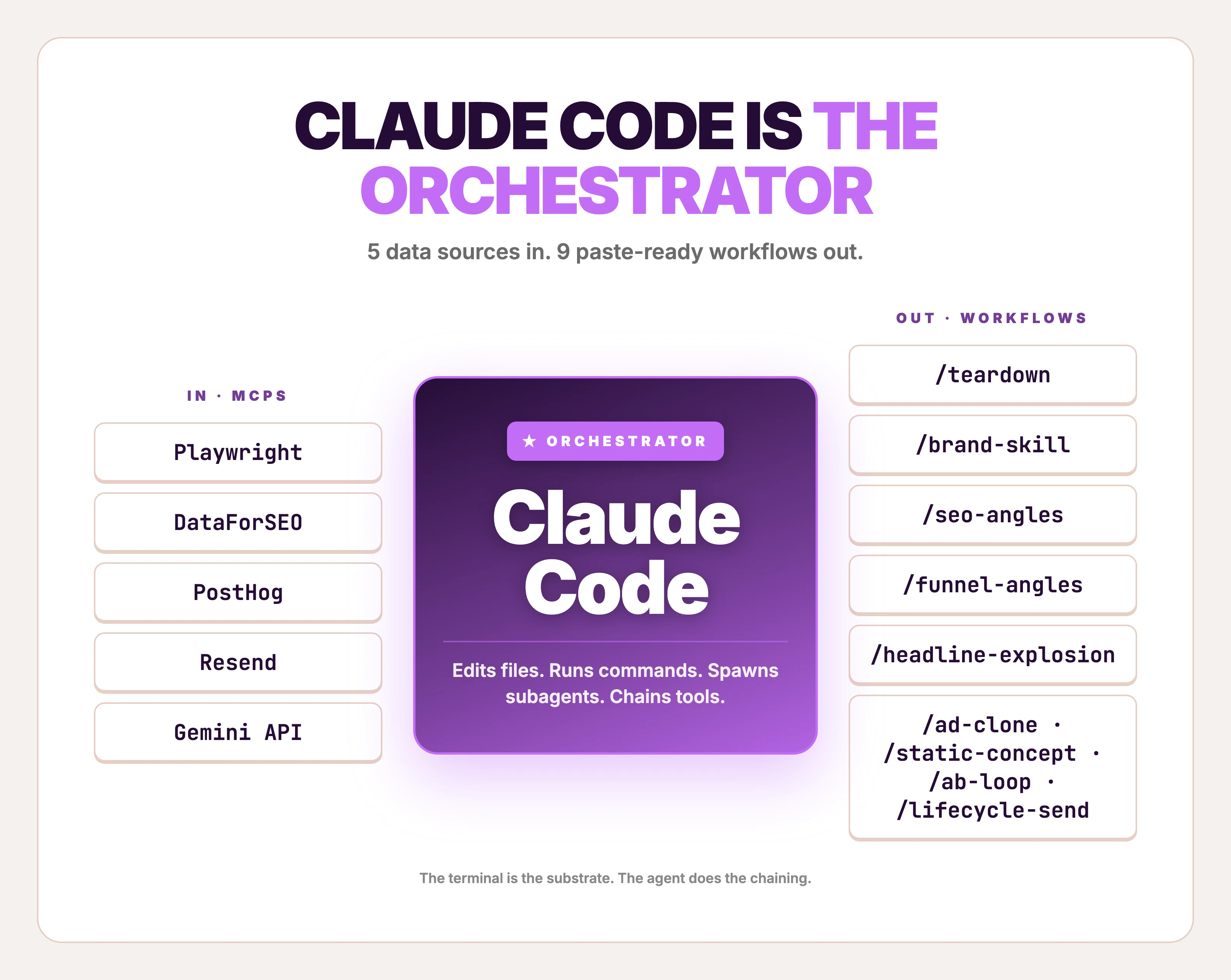
The 9 workflows in this post
Each ends at something you can ship — angles, variants, briefs, a sent campaign — except #6, which ends at a generated ad image with caveats. Skim and jump:
| # | Slash command | What it ships | MCPs used | Time |
|---|---|---|---|---|
| 1 | /teardown | Ranked competitor ad teardown with workhorse template ID'd | Playwright MCP, optional Foreplay | 30–60 min |
| 2 | /brand-skill | A reusable brand voice + ICP + messaging skill | Filesystem (CLAUDE.md + skills/) | 90 min one-time |
| 3 | /seo-angles | Ad angles derived from competitor SEO | DataForSEO MCP, subagents | 15 min |
| 4 | /funnel-angles | Ad angles derived from your highest-converting funnel paths | PostHog MCP | 10 min |
| 5 | /headline-explosion | 30+ headline variants across opener types and char limits | None (subagent fan-out) | 5 min |
| 6 | /ad-clone | A generated ad image from a reference + product photo | Gemini / Nano Banana 2 API | 30–90 sec |
| 7 | /static-concept | A structured ad concept from a 320+ template-pattern library | Filesystem skill | 60 sec |
| 8 | /ab-loop | Scheduled A/B refresh that ships winners after a human gate | PostHog MCP, Routines | 10 min build, runs forever |
| 9 | /lifecycle-send | Newsletter or lifecycle email sent from the terminal | Resend MCP | 60 sec/send |
Workflow zero is the teardown. None of the rest matter without it.
1. Reference-ad teardown (Foreplay + Meta Ad Library)
Run this when you have a product but no working ad — and you want to start from a layout that's already proven to convert, not a blank canvas. Every ad workflow starts with picking the right reference — this is workflow zero.
Alice Roussel's 213-ads-in-an-hour piece is the proof-of-concept. Playwright MCP scrapes the Meta Ad Library; Claude Code structures the result; you rank by runningDays and pick the workhorse template — the one a competitor has been running for 60+ days, because that's the ad that's making them money.
Inputs:
- Brand: [competitor brand name]
- Meta Ad Library URL: [URL]
- My product category: [category]
Steps:
- Use the Playwright MCP to load the Meta Ad Library page for the brand.
- Scrape every active ad: ad ID, first-seen date, runningDays, format (image/video/carousel), headline, primary text, CTA, landing-page URL.
- Save to ./teardowns/[brand]-[YYYY-MM-DD].json
- Rank ads by runningDays descending. Top 5 are workhorses.
- For each workhorse, output: layout pattern (split, full-bleed, product-on-color, before/after, lifestyle, UGC), the ONE promise the headline makes, and the proof point (number, brand name, or social signal).
- Pick the single template repeated most across the top 5 — that's the brand's bet.
Output: a markdown file with the top-5 table + a 1-paragraph "what this brand has learned about its customer" synthesis.
Output is a ranked table — not a screenshot dump. A weekly cadence on three competitor brands keeps the teardowns directory fresh without becoming a job. A well-done synthesis paragraph reads like a teardown: the recurring layout, what makes it convert, what makes it Fenty-shaped or Glossier-shaped, and the receipts behind the claim.
Sample output (illustrative — composed to show what /teardown returns when run on a fictional skincare brand "Lumen"; not a real run):
Top 5 workhorse ads (by runningDays):

1. ad_8a4f — 91 days running — split layout, product left / claim right
   Promise: "Hydration that lasts 24 hours, on dry skin"
   Proof: dermatologist quote + 4.8★ 12,000 reviews

2. ad_22e1 — 84 days — before/after photo
   Promise: "Visible difference in 14 days"
   Proof: real customer photo + day count

3. ad_31b8 — 76 days — UGC selfie + caption screenshot
   Promise: "I'm 47 and people ask if I'm 35"
   Proof: customer quote + age claim

4. ad_55cd — 71 days — full-bleed product macro
   Promise: "One bottle = 90 days"
   Proof: per-day cost ($0.42)

5. ad_67ff — 68 days — split, hero shot + ingredient list
   Promise: "Pharmacy-grade ingredients at retail prices"
   Proof: side-by-side price + ingredient comparison

Workhorse template: split layout, product + claim, dermatologist or per-day-cost proof.
That's Lumen's bet — they've spent 91 days proving it works.
That workhorse template feeds Workflow #6 as the visual reference.
Variations to try:
- Cross-brand workhorse pattern. Scrape five direct competitors at once and rank by
runningDaysacross the whole pool. The pattern that repeats across competitors is the category default — and the contrarian play is the layout nobody runs. - Add the landing page. Append: "For each top-5 ad, fetch the landing page and report the H1 + price + offer." Closes the ad-to-LP loop.
- Filter by format. Add: "Only return single-image static ads, not video or carousel." Static is where most small-ecommerce revenue happens; video adds noise to the analysis.
Failure mode (skip the runningDays rank): Without ranking by runningDays, you treat all 47 active ads as equal — and the brand's three-day experimental ads pollute your "what's working" picture. The 60+ day ads are the ones spending real money. Rank by recency-of-first-seen and you'll teardown the wrong template.
2. Brand voice and ICP as Claude Code skills
Set this up once. Reuse it forever. Elaine Zelby of Tofu put the rule bluntly in MKT1's roundup: before you build any agent, create three skills — ICP, personas, messaging. Emily Kramer (also MKT1) said she'd "basically recreated my marketing brain in skills." That's the unlock. Every prompt you'd otherwise repeat ("our ICP is solo Shopify founders, our voice is...") becomes a file Claude Code loads automatically.
Skills live in .claude/skills/ as plain markdown. One file each for brand voice, ICP, and messaging — three files, ~200 words each — and every workflow downstream reads them as context.
Inputs:
- Homepage URL: [URL]
- 3 best-performing ads (paste copy or screenshots): [paste]
- 5 customer reviews / support tickets / Reddit threads: [paste]
Generate three skill files:
-
.claude/skills/brand-voice/SKILL.md
- Voice adjectives (5)
- Banned words (10)
- One worked rewrite: a generic SaaS sentence → our voice
- 3 phrases customers use that we'd never write ourselves
-
.claude/skills/icp/SKILL.md
- Primary persona: 1 sentence
- 3 jobs-to-be-done, each with the trigger event
- 3 objections + the defuse for each
- 5 platforms they spend time on (ranked by relevance, not size)
-
.claude/skills/messaging/SKILL.md
- Single-sentence positioning
- 3 angles we test, with the buyer motivation each anchors
- 1 anti-positioning: what we explicitly don't claim
For each file, frontmatter:
name: [name] description: Loaded automatically when generating ad copy or angles for [brand]. ---
Three skill files. ~600 words total. Loaded automatically by every other workflow on this list.
Sample output (illustrative — what brand-voice/SKILL.md looks like for a fictional iced-coffee subscription "Drip"):
---
name: brand-voice
description: Loaded automatically when generating ad copy or angles for Drip.
---

## Voice adjectives
- Direct (no hedging, no "discover")
- Math-forward (always include the per-cup price)
- Quietly confident (period-energy, not exclamation)
- Customer-language-first (use what subscribers say in support tickets)
- Anti-aspirational (we don't sell mornings, we sell a removed line)

## Banned words
discover, elevate, premium, artisan, curated, journey, experience,
luxury, indulge, treat yourself

## Phrases customers use we'd never write
- "I forgot my coffee shop existed"
- "$1.40 a cup is dumb-cheap"
- "The orange box on my counter Tuesday morning"
That file becomes the implicit context every time Claude Code drafts ad copy for the brand. The "voice is..." paragraph stops getting pasted into every prompt.
Variations to try:
- Add a competitor-positioning skill. A fourth skill with three rivals, what each leads with, and one objection each pretends doesn't exist. Loads any time someone runs
/seo-anglesor/teardown. - Layer per-product skills. A skill per SKU (
.claude/skills/products/[sku]/SKILL.md) with the unit economics, the warranty, and the "why this product, why now" pitch. Reused by every ad-copy and email skill. - Version the skills. Commit to git. When the brand voice shifts, you can roll back. Treat brand documents like code — because Claude Code does.
Failure mode (skip the customer-language section): Without the "phrases customers use we'd never write" block, every downstream ad-copy generation defaults to the model's average B2C marketing register. You'll get "elevate your morning" in 4 of 5 hooks. Customer-language phrases are the only thing that snaps the model out of its default.
3. Competitor SEO into ad angles
When you've already torn down what competitors run on Meta, run this to find what they run on Google. The keywords they bid on and rank for are objection-shaped — and ad angles that defuse those objections punch above their weight.
DataForSEO MCP makes this a single Claude Code call. Spawn three subagents in parallel — one per competitor — fan out the keyword pull, then merge.
Inputs:
- 3 competitor domains: [domain1], [domain2], [domain3]
- My product category: [category]
Steps:
- Spawn 3 parallel subagents. Each calls DataForSEO MCP: dataforseo_labs_google_ranked_keywords for one competitor. Limit: top 100 by traffic value, US, English, last 30 days.
- Merge results. Tag each keyword with intent (informational, commercial, navigational, transactional).
- Find the 10 keywords where 2+ competitors rank but my domain doesn't.
- For each of those 10, infer the buyer objection it implies. (e.g. "[product] vs [alternative]" = "is this worth it over X") (e.g. "[product] reddit" = "are real customers buying or is this hype")
- For the 5 highest-volume objection keywords, write an ad angle that addresses the objection directly in the headline.
Output: a table — keyword, volume, implied objection, ad-angle headline (12 words max). Save to ./angles/seo-[YYYY-MM-DD].md
Subagent fan-out is the move. Three competitors × ranked-keywords queries = three slow API calls in parallel, ~30 seconds total versus 90 seconds sequential.
Sample output (illustrative — composed to show the output shape on three fictional ergonomic-mouse brands; not a real run):
| Keyword                          | Vol/mo | Implied objection                | Ad-angle headline                       |
|----------------------------------|--------|----------------------------------|-----------------------------------------|
| ergonomic mouse vs vertical      | 1,900  | Is vertical worth it             | "Ergonomic, not weird-shaped"           |
| best mouse for wrist pain reddit | 880    | Real users vs marketing claims   | "What 4,200 r/MK users actually use"    |
| ergonomic mouse for small hands  | 590    | Sizing assumed wrong             | "Sized for 6.5–7.5 inch hands"          |
| logitech mx vertical alternative | 480    | Logitech is too expensive        | "Same wrist angle. Half the price."     |
| are ergonomic mice worth it      | 390    | Whole category skepticism        | "Or keep the wrist clicking. Your call."|
Five headlines. Each one defuses an objection a competitor has been spending money to capture on search. They feed Workflow #5 (headline explosion) as the seed for variant grids, or Workflow #6 to clone the winning visual treatment.
Variations to try:
- Switch the data axis. Replace
ranked_keywordswithdomain_intersectionto find keywords where two-of-three competitors rank but the third doesn't — that's a feature comparison the third competitor avoids, which is an angle to test. - Layer a backlink check. Add a fourth subagent calling
backlinks_summaryfor each competitor. Pages that pulled the most backlinks are usually the strongest content angles — and they translate to ad hooks the audience already responds to. - Filter by SERP feature. "Only keywords where the competitor wins a SERP feature (PAA, featured snippet, knowledge panel)." Those are the angles the search engine has algorithmically certified as relevant.
Failure mode (skip the objection inference): Without the "infer the buyer objection it implies" step, you get a keyword list, not an angle list. A keyword list is what every "use Claude Code for SEO" post already gives you. The objection translation is what turns SEO data into ad copy.
4. Top-converting funnel paths into ad angles
Use this when you have first-party traffic and don't know which page or message is doing the conversion work. PostHog MCP gives Claude Code direct read access to your funnels and HogQL — no dashboard, no BI tool, no analyst on Slack. Matt Firestone (3× YC GTM lead) used a similar setup to build an account-scoring agent that drove 2–3× positive response rate on his highest-priority accounts. Same pattern, applied to ad angles rather than outbound.
A reasonable cadence is Friday morning on the previous week's signups — small enough sample to spot anomalies, large enough to surface durable patterns.
Inputs:
- PostHog project ID (auto-loaded from ~/.posthog)
- Conversion event: [e.g. "signup_complete"]
- Window: last 30 days
Steps:
- Query PostHog MCP for the top 5 funnel paths ending in the conversion event. Group by referrer + landing-page slug + first-event device.
- For each path, pull the top 3 page properties on the entry page (H1, hero subhead, primary CTA copy).
- For the top path, write 3 ad angles that double down on the message that's already converting (lean into the winner).
- For paths 2-5, write 1 angle each that hypothesizes WHY this path converts and how to amplify it in cold acquisition.
Output: a markdown table — path, conversions, entry-page H1, hypothesis, angle headline. Save to ./angles/funnel-[YYYY-MM-DD].md
"Hypothesizes WHY this path converts" is the load-bearing line. Without it, you get a list of converting URLs and nothing useful.
Sample output (illustrative — composed to show what /funnel-angles returns; brand and paths are hypothetical):
| Path                                  | Conv. | Entry H1                               | Hypothesis                                  | Angle headline                          |
|---------------------------------------|-------|----------------------------------------|---------------------------------------------|-----------------------------------------|
| /blog/posthog-vs-amplitude → /        | 318   | "PostHog vs Amplitude: a real audit"   | Comparison-shoppers convert on side-by-side | "Stop running both. Audit one weekend." |
| reddit.com/r/saas → /                 | 211   | "Funnel analysis without the BI tax"   | Refer-traffic; Reddit voice is anti-hype    | "$0 BI license. Free to leave."         |
| /blog/funnel-design-mistakes → /      | 174   | "Five funnel mistakes worth fixing"    | Operators arrive after diagnosing pain      | "Diagnosed it. Now fix it in an hour."  |
| google /how to track activation → /   | 98    | "Activation in 200 lines of HogQL"     | Adjacent-tool searcher                      | "Activation, queryable, in one paste."  |
| google /event taxonomy template → /   | 62    | "The 12-event taxonomy that scales"    | Template-seeker, close-to-purchase intent   | "Skip the schema doc. Start the import."|
Five angles, each one anchored in actual conversion data, ready to drop into Workflow #5 as the seed for variant explosion.
Variations to try:
- Add a paid-vs-organic split. "Group by source.utm_source." When the paid version of a path converts at 3× the organic version, you've found a message-channel fit worth scaling.
- Cohort by purchase tier. Add: "Filter to users who hit $33+ tier." The angles that drive Pro signups are different from the ones that drive Free signups — both matter, but they're separate ad sets.
- Run weekly. Schedule via Claude Code Routines with the same prompt. Every Friday morning, the angles file lands in
./angles/funnel-[YYYY-MM-DD].md. No human in the loop until the angle review.
Failure mode (skip the entry-page H1 pull): Without the H1, you get path data without message context. A converting path tells you the channel works; the H1 tells you which message inside that channel did the work. Two different ad angles. Pull both.
5. Headline and copy variant explosion
Pair this with Workflows #3 and #4. With angles in hand, the next step is 30+ headlines across opener types, character limits, and platforms — fast enough to fill a 3×4 test matrix in one paste. Claude Code does this with subagent fan-out: spawn five subagents in parallel, each writing a different style class, merge the result.
Anthropic's Growth team uses this exact shape to ship 10× more ad-copy variations than before. Different scale, same pattern. (For prompt-by-prompt copywriting work that doesn't need a terminal, the ChatGPT for marketing playbook covers the single-prompt versions.)
Inputs:
- Angle: [one-line angle from /seo-angles or /funnel-angles]
- Product: [one-line description]
- Platforms: [Meta feed, Meta Story, TikTok, Google RSA]
Spawn 5 subagents in parallel. Each writes 6 headlines in one style:
- Subagent A: Question opener
- Subagent B: Specific number
- Subagent C: Pain-point named
- Subagent D: Comparison ("X for Y" or "X vs Y")
- Subagent E: Customer-quote shape
Constraints applied to all 30:
- ≤30 characters for Meta Story / TikTok overlay
- ≤40 characters for Meta feed primary
- ≤30 characters for Google RSA headline (MAX 30, hard limit)
- No banned words from .claude/skills/brand-voice
- Each headline tagged with its style + the platform it best fits
Output: a 30-row table — style | platform fit | char count | headline.
30 headlines in five styles, hard char limits enforced. Subagent isolation means each style class doesn't bleed into the others — you get a real spread, not 30 variations of the same sentence.
Sample output (illustrative — first 6 rows of what /headline-explosion returns for the angle "$1.40 per cup vs $4.50, same coffee"):
| Style          | Platform fit  | Chars | Headline                          |
|----------------|---------------|-------|-----------------------------------|
| Question       | Meta feed     | 38    | Why are you still buying $4.50    |
|                |               |       | coffee?                           |
| Specific num.  | Google RSA    | 28    | $1.40 a cup. Same coffee.         |
| Pain-point     | TikTok        | 27    | The line gets longer every day    |
| Comparison     | Meta Story    | 24    | $1.40 vs $4.50. You decide.       |
| Customer-quote | Meta feed     | 35    | "I forgot my coffee shop existed" |
| Specific num.  | Meta Story    | 29    | 30 cups. $42. Done.               |
A 30-row output drops straight into a 3×4 (or 5×4) test matrix in your ads manager. Tag the winning style after week one — that's the house style for the next 90 days.
Variations to try:
- Swap the styles. Replace "Customer-quote" with "Contrarian opener" when launching a category-challenger position. Replace "Question" with "Story-fragment" when the angle leans narrative.
- Layer a banned-word check. Add: "After generation, run a regex match against [banned words]. Replace any flagged headline." Catches model drift back to default register.
- Run for body copy too. Add a sixth subagent: "30-word primary text, one per headline, leading with the same opener." Now you have 30 headline + body pairs in one paste.
Failure mode (skip the character limits): Without ≤30 characters for Google RSA, you get one headline that fits, 29 that don't. Google rejects them on upload, you spend 20 minutes manually rewriting, and the time saved by the variant explosion is gone. Hard limits are the load-bearing constraint.
6. Reference ad to generated ad (Nano Banana 2)
Reach for this when you've picked the workhorse template from Workflow #1, written the angle from #3 or #4, and you need a visual to test. This is where Claude Code calls Gemini 3.1 Flash Image (codename Nano Banana 2) directly via the Gemini API — pass the reference ad as image input, the product photo as image input, the brand colors and copy as text instructions.
The practitioner pattern is documented. Banana-claude on GitHub wires Nano Banana 2 into Claude Code as a slash command. Tyler Germain's Meta-ads-with-Claude-Code tutorial walks through the same shape end-to-end. Pricing runs $0.067 per image at 1K, $0.151 at 4K, batch API 50% off. A 50-ad batch at 1K runs ~$3.35 raw. (For a deeper look at Nano Banana 2 vs GPT Image 2 vs Flux, the model-landscape post covers the tradeoffs.)
Honest framing: this gets you a generated ad. Not a brand-consistent cloned ad. The output varies on layout fidelity, color match, and product likeness. Sometimes the model drops the logo. Sometimes the product looks 80% right but the bottle cap is wrong. That's a known limitation of any LLM-driven creative endpoint, not a fixable prompt-engineering problem.
Inputs:
- Reference ad image path: ./teardowns/lumen/ad_8a4f.png
- Product photo path: ./products/sku123/hero.png
- Logo path: ./brand/logo.png
- Brand colors: #0E1A2B, #F4E1B6, #C84A2A
- Headline: "[from /headline-explosion winner]"
- Output dimension: 1080x1350 (Meta feed 4:5)
- Output dimension: 1080x1920 (Meta Story 9:16)
Steps:
- Call Gemini 3.1 Flash Image (gemini-3-pro-image) via Google AI SDK. Pass: reference image (as input image), product photo (as input image), logo (as input image), text instruction.
- Text instruction: "Recreate the layout, composition, and visual style of the reference ad. Replace the original product with the supplied product photo. Preserve relative position, scale, and lighting. Apply the brand colors. Place the logo bottom-right. Render headline in the same typographic position as the reference."
- Generate one image per output dimension.
- Save to ./ads/[sku]/[angle]/[YYYY-MM-DD]-[dimension].png
- Log raw cost (count × $0.067) to ./ads/cost-log.csv
A real run of this prompt against a workhorse skincare reference + a product photo will produce something close to the reference — but expect drift. Three out of five generations might be usable; two need hand-fix or full re-roll. That's why Workflow #6 is the only one in this list where the failure mode is "the output exists." Quality is the question.
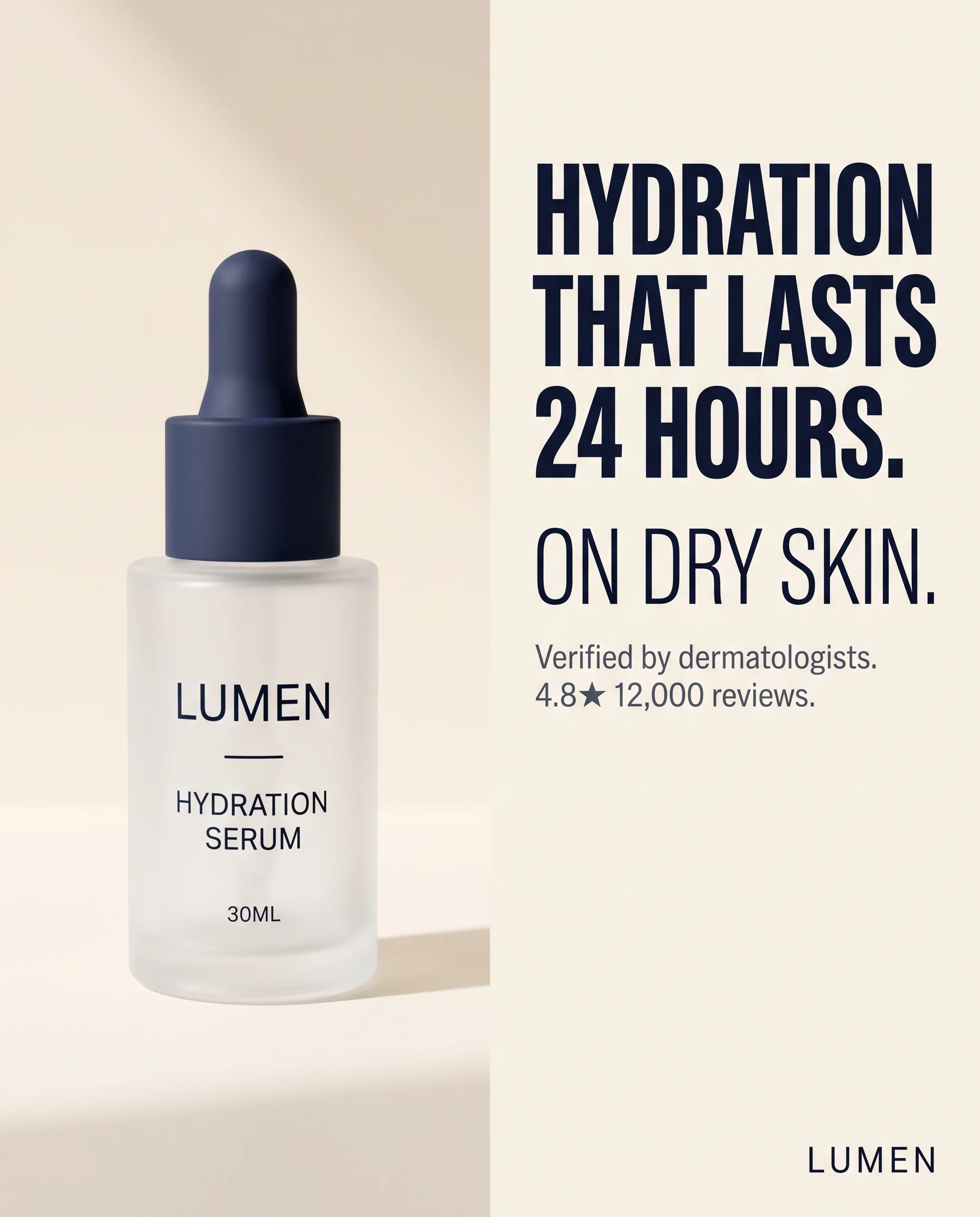
The image above is one real Nano Banana 2 generation from the Workflow #6 prompt — the prompt was run once at 4:5 aspect ratio, 2K resolution, no retries. Layout fidelity is good on this attempt; type rendering is clean; the bottle is on-brief. Half of generations land here. The other half drop the logo, get the cap wrong, or render the headline as a different word entirely.
What you get back: a PNG at the requested dimension. Most of the time the layout matches. The product placement is usually close. Brand color match is the weakest link — programmatic palette extraction would do this better than text instruction. Logo placement drifts on roughly half of generations; expect to either hand-place or run the generation 3× and pick.
Variations to try:
- Batch the angle dimension. Loop over five angles × two dimensions = 10 generations per product. Cost: $0.67 raw on 1K. The model's variance becomes a feature — pick the best two of ten.
- Layer a critic subagent. Add a second Claude Code call after generation: "Review this ad image against the brand voice skill. Score logo placement, color match, and product likeness from 1-5. Flag any score under 3." Auto-rejects the obvious misses before they hit your review queue.
- Switch to Imagen 4 or Flux for layout-heavy ads. Different models handle composition differently. Nano Banana 2 is the strongest editor (works from a reference); Imagen 4 is sometimes stronger on type rendering. The model landscape post covers when each one wins.
Failure mode (skip the logo image input): Without the logo as a separate input image, the model improvises a placeholder. Sometimes it's close. Sometimes it generates a four-letter wordmark that has nothing to do with your brand. The text instruction "place the logo bottom-right" only works when the model has the logo image to place. Pass it, every time.

Create your own product product ads
Create your ad
7. Static ad concept generator
Pull this in when you have a product but no angle, no reference ad, and no time to teardown a competitor. Static-ad concept generators turn a one-line product description into a structured concept brief — layout pattern, copy direction, visual treatment — that downstream tools (or designers, or Workflow #6) can render.
Composio's awesome-claude-skills repo ships a competitive-ads-extractor skill that operates in this space. Creatify also publishes a static-ad-concept-generator GitHub skill — cite, don't endorse. Pick one as a starting point and adapt to your category. The pattern: 320+ template patterns indexed by industry, format, and conversion goal, with a Claude Code skill that picks the right pattern given a product brief.
Inputs:
- Product: [one-line]
- Industry: [skincare | apparel | supplements | tech | other]
- Goal: [click | install | purchase | lead]
- Platform: [Meta feed | Meta Story | TikTok overlay | Google display]
- 1 ad angle (from /seo-angles or /funnel-angles)
Steps:
- From .claude/skills/static-templates (320+ patterns), filter by industry + goal + platform. Return 5 candidate patterns.
- For each, output:
- Layout name (split, full-bleed, before/after, UGC-frame, product-on-color)
- 1-line composition note (what's where)
- Headline placement
- Body-copy placement
- CTA placement and recommended verb
- Score each pattern 1-5 on fit-to-angle.
- Pick the top 2. For each, write the actual headline + body + CTA that would render inside the pattern.
Output: a 2-concept brief, ready to hand to /ad-clone (Workflow #6) as the reference, or to a designer.
Static-templates lives as a folder of markdown files — one per pattern, ~50 words each, with a reference image link. Build it once (or fork an open one), reuse it forever.
Sample output (illustrative — composed to show what /static-concept returns for a fictional $40 ergonomic mouse with the angle "Sized for 6.5–7.5 inch hands"):
Pattern A — Split layout (4.5/5)
- Composition: Product macro left half, claim block right half
- Headline placement: top-right, 2 lines max
- Body: middle-right, 3 lines, supports the claim
- CTA: bottom-right, button-shape, verb "Find your size"

Headline: "Sized for 6.5–7.5 inch hands"
Body: "Most ergonomic mice assume one hand size. We measured 4,200 to ship 3."
CTA: "Find your size"

Pattern B — Before/after stack (3.5/5)
- Composition: Top half = generic mouse + cramped hand;
  bottom half = our mouse + relaxed hand
- Headline placement: between the two photos
- Body: under the bottom photo
- CTA: below body

Headline: "The wrist clicks. Or it doesn't."
Body: "Same task. Same hand. Different mouse. Click the one that fits."
CTA: "See the difference"
Two concepts, ready to ship to Workflow #6 with the reference layout described.
Variations to try:
- Layer the teardown. Pass the workhorse template from
/teardown(Workflow #1) as a constraint: "Pick the pattern that most closely matches the workhorse." Combines competitive intel with template-library breadth. - Add a price-point filter. "Only patterns proven to convert for SKUs under $50." High-AOV ads use different patterns (more lifestyle, more aspiration); low-AOV uses tighter, math-forward layouts.
- Cross-reference with /headline-explosion. Pass the 30 generated headlines and ask the skill to map each headline to its best-fit pattern. Now your test matrix has visual + copy compatibility scored.
Failure mode (skip the platform constraint): Without Platform: Meta Story | TikTok overlay, the skill defaults to feed-shaped layouts — landscape-leaning, headline-heavy. Story and TikTok placements need vertical composition with the headline in the top third (where the eye lands before scroll). Wrong platform constraint, wrong layout, wrong test.
8. A/B test orchestration that runs without you
Build this once. Schedule it. Walk away. The best Claude Code workflows aren't prompts — they're routines that run on a cron and ship results to Slack while you sleep. Eoin Clancy at AirOps built a content version of this: a GSC + multi-MCP pipeline that ships three refreshed posts per week end-to-end inside Claude. The ad equivalent is the A/B refresh loop. (How to actually structure an ad creative test covers the test-design fundamentals — assume those before wiring the loop.)
A reasonable cadence is twice a week — Tuesday and Friday morning, before the first coffee.
Steps:
- Pull last 7 days of ad-set performance from PostHog MCP: ad_id | impressions | clicks | conversions | spend | CPL
- Identify any ad with statistical-significant CPL <= 80% of baseline (n >= 1000 impressions, p < 0.10). Those are winners.
- Identify any ad with CPL >= 130% of baseline AND n >= 1000. Those are losers.
- For each winner: run /headline-explosion seeded with the winner's headline. Output 6 new variants in the same style class as the winner.
- For each loser: run /ad-copy-autopsy on the losing ad. Output: weakest element + 3 rewrites of only that element.
- Output a markdown digest:
- Winners (with the 6 new variants for each)
- Losers (with the autopsy + rewrites)
- Recommended action: pause the losers, scale the winners, ship the variants
- Send digest to Slack #ads channel via Slack MCP.
Action gate: do NOT auto-launch new ads. Output the digest. Human approves in Slack with a thumbs-up emoji. /ab-loop checks for the emoji on next run.
Action gate is the load-bearing line. Technically.dev let Claude Code autonomously run a $1,500 Meta campaign for a month — final CPL came in at $6.14 against a $2.50 target, 146% over. The interesting finding wasn't that autonomous bidding overshoots (it does); it was that the "ugly whiteboard" creative the model defaulted to hit $1.29 CPL on day 12. The model picked weird-looking ads on Meta feed and won. That's the case for the human gate: the autonomy works on creative direction, not on launch authority.
Sample output (illustrative — composed to show the digest shape /ab-loop produces; numbers and ad IDs are fictional):
WINNERS (3):
- ad_8a4f — split layout, "$1.40 a cup vs $4.50" headline
  Performance: 412 conv / $1.18 CPL (baseline $2.40, 51% under) / n=22,400
  6 new headline variants in the comparison-style class generated.
  Recommended: scale 2× spend, ship 6 variants in same ad set.

- ad_22e1 — UGC selfie, "I forgot my coffee shop existed"
  Performance: 287 conv / $1.34 CPL (baseline $2.40, 56% under) / n=18,900
  6 new variants in customer-quote class generated.
  Recommended: scale 2× spend, ship 6 variants.

- ad_31b8 — before/after, "30 cups, $42, done thinking"
  Performance: 198 conv / $1.61 CPL (66% of baseline) / n=12,300
  Recommended: scale 1.5× spend, ship 6 variants.

LOSERS (2):
- ad_55cd — full-bleed, "Premium coffee delivered fresh"
  Performance: 41 conv / $4.92 CPL (baseline $2.40, 205% over) / n=14,200
  Autopsy: weakest element = headline. Two table-stakes adjectives,
  no specific number, no friction-named.
  3 headline rewrites generated.
  Recommended: pause. Re-test with rewrite #1.

- ad_67ff — split, generic stock-photo product
  Performance: 22 conv / $7.10 CPL (baseline $2.40, 296% over) / n=11,800
  Autopsy: weakest element = visual. Stock-photo product reads as low-trust.
  Recommended: pause. Re-shoot product OR re-clone via /ad-clone.

Approve scaling decisions: react with 👍 on Slack thread.
The digest reads in Slack with morning coffee. A thumbs-up ships the variants and pauses the losers on the next run.
Variations to try:
- Tighten the significance bar. Default
p < 0.10is generous; for high-spend tests, setp < 0.05. Trades off speed for confidence. - Add a creative-fatigue check.
Flag any ad with frequency > 3.5 OR CTR-trend declining over 7 days.Fatigue is a separate failure mode from "the ad never worked" — the autopsy and the rewrite logic are different. - Layer a budget guardrail. "Cap all auto-scale recommendations at +50% week-over-week per ad set." Stops the loop from recommending a 4× scale on a small-sample winner.
Failure mode (skip the action gate): Without the human-approval line, the loop becomes the technically.dev experiment — autonomous ad ops, $6.14 CPL against a $2.50 target, $1,493 spent before someone reads the result. The action gate is the difference between a tool that proposes and a tool that decides. For ads, the answer is propose. Always.
9. Newsletter and lifecycle send from the terminal
Best for the moment you'd otherwise alt-tab to a marketing-automation tool to send one email. Resend MCP gives Claude Code direct access to send-email, create-broadcast, list-contacts, update-contact-topics, and scheduled sends — /lifecycle-send, paste the body, hit return.
Lifecycle and transactional surfaces want a different voice register: helpful and direct, not confrontational. Customer email isn't blog email. Same product, different voice.
Inputs:
- Send type: [newsletter | lifecycle | reactivation | one-off]
- Audience filter: [topic | segment | last-active window]
- Body markdown: [paste]
- Subject options: [3 candidates from /headline-explosion]
Steps:
- Validate audience filter against Resend MCP list-contacts. Output the count of recipients. Warn if > 10,000.
- Render the body markdown to React Email + plain-text.
- Pick subject: run a single Claude Code call against .claude/skills/brand-voice (lifecycle register) ranking the 3 candidates on (a) inbox-first-line clarity, (b) absence of clickbait, (c) under-50-character mobile fit.
- Generate a preview-text line (under 90 chars) that does NOT repeat the subject and that previews ONE specific value point.
- Output a preview file at ./outbox/[YYYY-MM-DD]-[type].html
- Wait for human approval (open the file in browser, react with "ship" in terminal).
- On approval, call Resend MCP send-broadcast with the rendered output and the chosen subject + preview text.
Preview-rendering plus a human-approval gate is what makes this safe enough to run from a terminal.
Sample output (illustrative — composed to show the /lifecycle-send flow on a hypothetical product-update newsletter; not a real send):
Audience filter: contacts with topic "product-updates" + last-active < 30 days
Recipient count: 2,847 (no warning, under 10K)

Subject candidates ranked:
1. "What we shipped this week (3 things, 1 of them small)" — 4.5/5
   inbox-first-line clarity, no clickbait, 53 chars (over 50, flag)
2. "Three product updates" — 4/5
   clear, but generic; underclaims the email
3. "We changed the export step. Faster now." — 4.5/5
   specific, slightly punchy; 41 chars; recommended

Recommended subject: candidate #3
Preview text: "Plus a new aspect ratio and a fix for the logo placement bug."

Preview file: ./outbox/2026-04-25-newsletter.html
Open in browser? (Y/n) > Y
Approve and send? Type "ship": > ship

Resend MCP send-broadcast: queued.
Send ID: bcst_9F2A1...
Whole flow takes about 4 minutes — most of it spent reading the rendered preview. Send is the last keystroke.
Variations to try:
- Add a deliverability pre-check. Before send, call a deliverability API (or a paste of
mail-tester.comresults) and surface the score. Block on score < 8/10. - Schedule it. Replace
send-broadcastwithcreate-broadcast+scheduled_at: ...for a Tuesday morning send written on Monday afternoon. - Layer customer voice from Workflow #8. When the email is reactivation, pass the autopsy output of recently-paused ads to the body skill. The reactivation copy lands harder when it acknowledges what stopped working.
Failure mode (skip the recipient-count warning): Without the Warn if > 10,000 line, a typo in a topic filter can accidentally broadcast to your whole list. Resend will happily send to 50,000 contacts at $0.001 each — the cost is fine, the cleanup is not. Always print the count before the approval prompt.
What Claude Code is bad at for ad creation
Claude Code rate-limits hurt. The Pulse Report's open-text answers were unanimous: credits and costs are the #1 complaint, named by ~50% of operators. The Boring Marketer documented cutting weekly spend from $400 to $15 by defaulting to Haiku for 80% of work. Sonnet is great. Sonnet is also 5× the cost. Treat model selection as a marketer skill, not a developer one.
Claude Code regresses. Anthropic shipped three simultaneous Claude Code regressions between March 4 and April 16, 2026 — default reasoning dropped high-to-medium, a reasoning-history bug, and a 25-word system-prompt cap. One CSO measured a 47% drop in code quality during the incident. The regressions resolved by April 20 and usage limits reset April 23. The takeaway isn't "Claude Code is broken." It's that any pipeline calling an LLM as the final creative step inherits the LLM's non-stationarity. A pipeline with a deterministic creative endpoint is more durable.
Claude Code can't run autonomous ad ops yet. Technically.dev's experiment is the receipt: $1,493 spent / 243 leads / $6.14 CPL vs $2.50 target — 146% over. The interesting finding inside the failure: a hand-drawn whiteboard ad the model produced organically came in at $1.29 CPL on day 12. Autonomous creative direction sometimes wins. Autonomous bidding overshoots. The action gate in Workflow #8 is the lesson.
Boring Marketer's quote on the on-ramp says it cleanly: "first week is frustrating as hell." MCP layers are brittle (auth flows fail, rate limits cap mid-pipeline, schema mismatches cost an hour to debug). Skill ecosystems are fragmented (355 skills on marketingskills.directory, 53 in Corey Haines's repo, 19 in the paid-ads category — most overlap, none are stable APIs). Treat the first month of Claude Code adoption as a budget item, not a quick win.
A realistic on-ramp
Workflow #1 is the highest-leverage hour of Claude Code work for any product brand because it tells you what's already converting in your category — every other workflow runs better with that context. Workflow #2 is the second pick because it's a one-time cost that compounds across every prompt you'll ever run. From there, layer #3 and #4 to turn external and internal data into ad angles. Then #5 expands those angles into a 30-headline test grid. Workflows #7, #8, #9 are the long-running ops layer once a baseline is shipping.
Workflow #6 is the controversial one. The visual creative step is where Claude Code's orchestration model meets the hard limits of LLM-driven image generation. A generated ad image at $0.067 each is real progress; a brand-consistent cloned ad at the same cost is an unsolved problem. Most operators land on a hybrid: Claude Code for everything except the final visual, then a deterministic creative tool (purpose-built ad generators, or a designer with a brief) for the cloning step.
Cost discipline matters more than capability. The fastest way to lose money on Claude Code isn't a bad workflow — it's defaulting to Sonnet on a job Haiku could finish, or running an autonomous ad op without the gate. Pulse Report data agrees: ~50% of operators name credits and costs as their top complaint, not output quality.
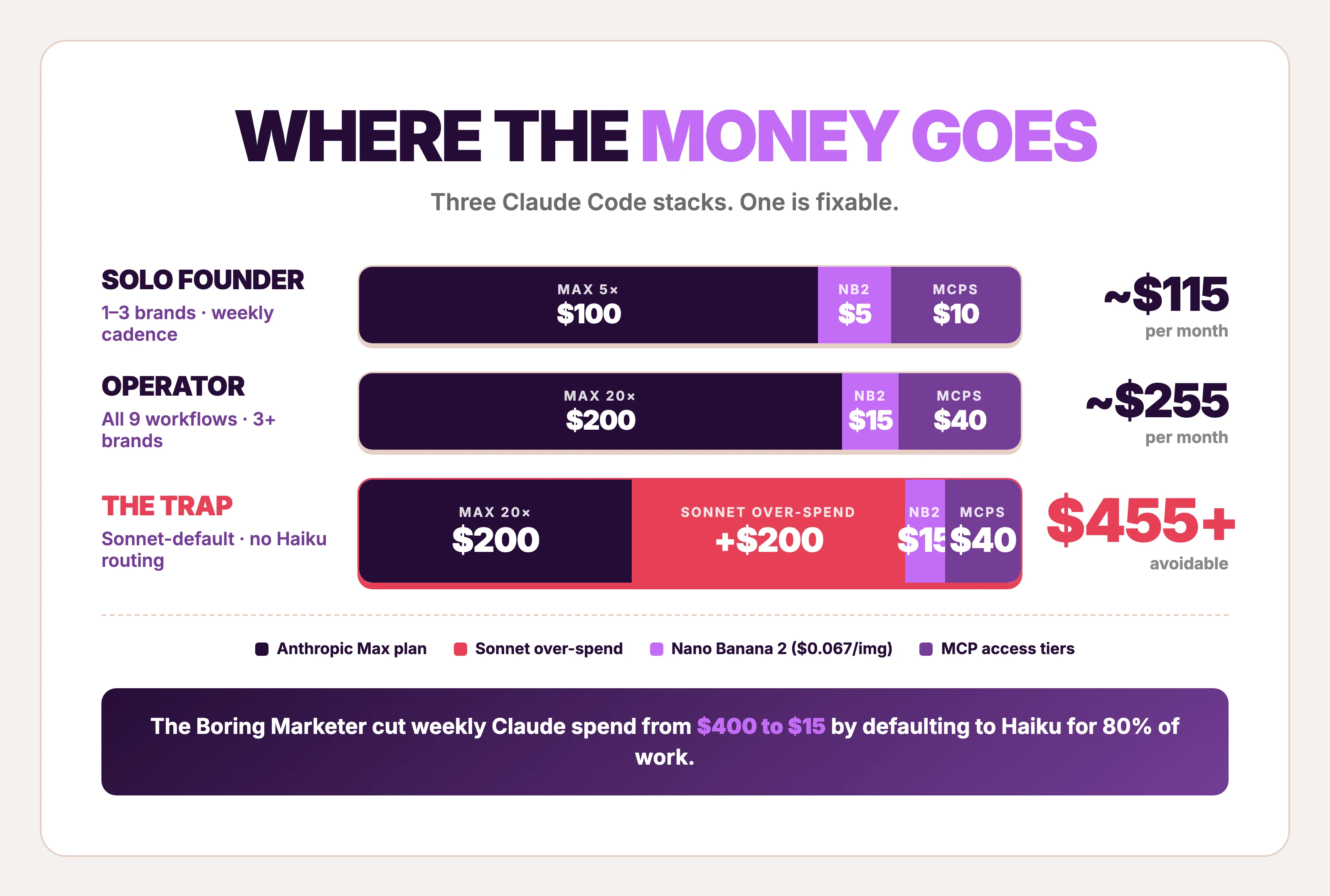
| Stack | Monthly | Notes |
|---|---|---|
| Claude Code Max 5× + Haiku-default routing | ~$100 + minimal API spend | Enough for solo founders running 1–3 brands; matches Boring Marketer's $15/wk after Haiku migration |
| Claude Code Max 20× + Sonnet for synthesis | ~$200 + Nano Banana 2 ($0.067/image) | Enough for an operator running all 9 workflows weekly across 3+ brands |
| Claude Code Pro + heavy MCP | $100 + per-call MCP costs | The bottleneck shifts to MCP rate limits before Claude usage; budget $20–50/mo for DataForSEO + PostHog access tiers |
Three caveats. Max plan limits reset every 5 hours; long-running pipelines need careful subagent budgeting. MCP auth is a per-server setup tax — plan a half-day for the first wave (PostHog, DataForSEO, Resend, Playwright, Slack). Skill files compound: every brand and product worth pursuing in Claude Code should get its own skill folder, version-controlled in git, treated as an asset rather than a prompt.
FAQ
How do I use Claude Code for marketing?
Start by writing three skill files in .claude/skills/ — brand voice, ICP, messaging — using Workflow #2 above. That's the "marketing brain" that every downstream prompt loads automatically. From there, layer MCPs (PostHog for funnels, DataForSEO for SERPs, Resend for email) and write small skills that compose them into one task each. Anthropic's Growth team runs five paid channels with one non-technical hire on this pattern. The workflow shape is settled. The on-ramp is the hard part.
How do I use Claude Code for Meta ads?
Three workflows do most of the work. Workflow #1 (/teardown) ranks competitor Meta ads by runningDays to find the workhorse template — the layout already proven to convert. Workflow #5 (/headline-explosion) generates 30 platform-tagged headlines under Meta's character limits. Workflow #6 (/ad-clone) calls Nano Banana 2 to generate a visual from the workhorse template + product photo. The pipeline ships in the order #1 → #3 or #4 → #5 → #6. Tyler Germain's end-to-end Meta-ads tutorial walks through a similar shape.
Can Claude Code create ads on its own?
Not deterministically. Claude Code can call Gemini 3.1 Flash Image (Nano Banana 2) at $0.067 per image and produce something that looks like an ad, but layout fidelity, color match, and logo placement vary run-to-run. Workflow #6 above ships a generated ad. Workflow #8 documents why autonomous ad ops overshot CPL by 146% in a $1,500 experiment. Use Claude Code for orchestration; pair it with a deterministic creative tool for the visual.
Do I need to code to use Claude Code for ads?
No. Claude Code is a terminal tool, but the workflows above are skill files (markdown) and prompts (English) — written once, executed automatically. Anthropic's documented Growth case study features a non-technical hire who'd never opened a terminal before building Figma plugins with Claude Code. For prompt-by-prompt copywriting that doesn't require any terminal at all, the ChatGPT for marketing playbook covers the same patterns in a chat surface.
Best first Claude Code workflow for ecommerce?
Workflow #1, the reference-ad teardown. It's the highest-ROI hour of Claude Code work for any product brand because it tells you what's already converting in your category — and every other workflow in this list runs better with that context. Second pick is Workflow #2 (brand-voice + ICP skills), because it's a one-time cost that compounds across every prompt. Skip the autonomous bidding experiments until 20+ ads have shipped through the manual loop. For Claude Code for Shopify operators specifically, the same pattern compounds — every teardown unlocks a category, every ICP skill cuts down on every future prompt.
Is Max plan worth it for a dropshipper?
Depends on volume. Max 20× is ~900 messages per 5-hour window, which is enough to run all 9 workflows above weekly with headroom for ad-hoc work. A dropshipper testing 30 SKUs a month with 4–5 angles each will hit those limits. A solo founder testing one product probably won't — Pro or Max 5× ($100) is closer. The Boring Marketer cut weekly Claude spend to $15 by defaulting to Haiku for 80% of tasks, which is the right move regardless of plan tier.