
Best AI image generators for ads in 2026


Midjourney generates a beautiful product scene in 9 seconds. Then you spend 45 minutes resizing it, adding your logo, overlaying a CTA, and exporting the right aspect ratios for Instagram, TikTok, and Facebook.
The AI isn't the bottleneck. The workflow is.
Every "best AI image generator for ads" article ranks the same nine tools on the same vague criteria — output quality, ease of use, pricing. Nobody asks the question that actually matters for someone who needs to run ads this week: which tool gets you from product photo to finished, platform-ready ad fastest?
That's what this piece covers. We compare the underlying AI image models (Midjourney, Gemini, DALL-E, Flux, Ideogram, Recraft), the purpose-built ad tools running on top of them, and the workflow strategy that determines whether your output looks like an ad or an AI art project.
The workflow gap no AI image generator for ads can solve
60% of U.S. ad agencies now use generative AI in their workflows. But using AI to generate an image and using AI to create an ad are two different problems.
The workflow for creating a platform-ready ad from a raw AI image generator like Midjourney looks like this:
- Write and iterate on the prompt (practitioners report averaging 3-5 attempts to get a usable result)
- Select the best output from multiple generations
- Resize for your platform (1:1 for feed, 9:16 for Stories, 16:9 for YouTube)
- Add text overlays — headline, CTA, price
- Apply brand elements — logo, colors, fonts
- Export in each required format
- Upload to your ad platform
Time per banner without automation: roughly 45 minutes. Producing 12 ad sizes from a single image takes about 3 hours, even with tools like Canva to speed the manual work.
Traditional agency timelines are worse. Brief on Monday, mockups Wednesday, revisions Thursday, finals Friday, launch the following Tuesday. Five to seven business days for a single creative.
AI product photography tools like Flair and Pebblely shorten the image generation step. But the post-production gap — resizing, branding, text, format export — remains. The gap between "the AI made an image" and "I have a finished ad" is where time and money disappear.
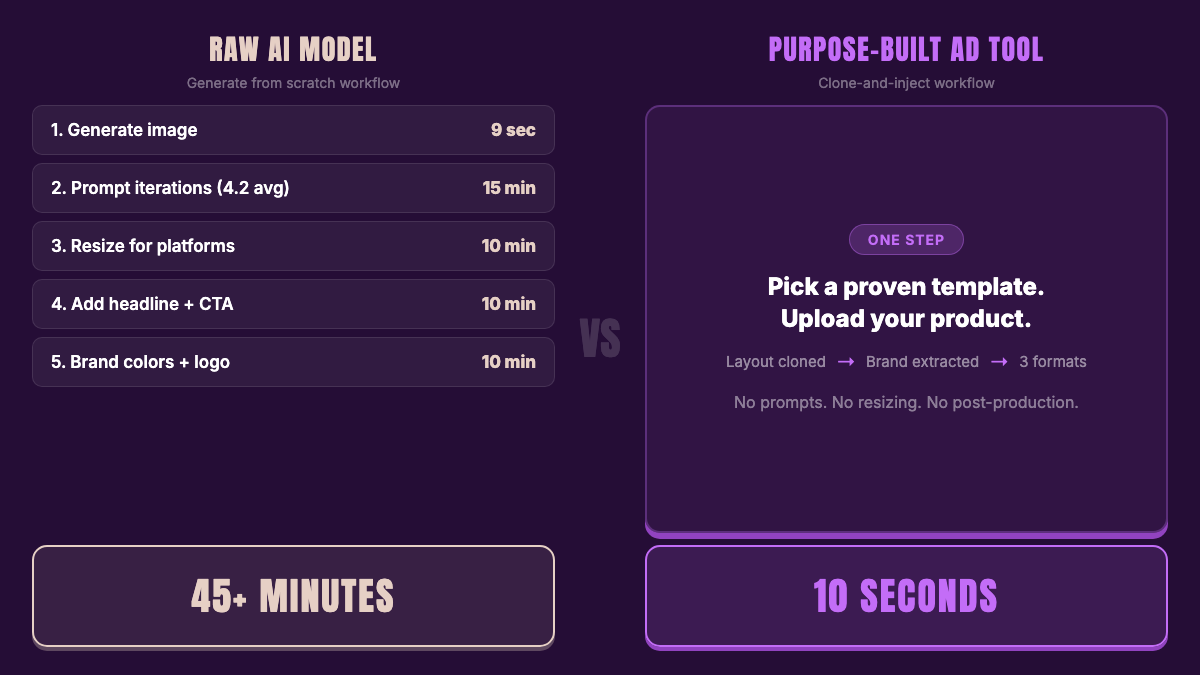
Purpose-built ad tools collapse that entire workflow. AdDogs generates a finished ad from a reference ad in seconds — product swapped in, brand colors extracted automatically, exported in your chosen format. No prompt engineering. No post-production. The comparison isn't AI model quality. It's workflow design.
The AI models powering every ad generator
Behind every ad creation tool is an image model. AdCreative.ai, Canva, Adobe, and AdDogs all run on one of a handful of foundation models. The model determines the raw output quality. The tool determines what you can do with it.
Seven models matter for ad creation in 2026. We evaluated each on the criteria that matter for ads — not art.
What makes a model good for ads (not art)
A model that generates beautiful landscapes is useless if it can't render your product accurately, spell your CTA correctly, or match your brand colors. Five criteria separate ad-ready models from art generators:
| Criteria | Why it matters for ads |
|---|---|
| Product placement | Can it accurately place YOUR product in a scene without distorting labels, shapes, or packaging? |
| Text rendering | Can it spell "50% OFF" or "Shop Now" without garbling the letters? |
| Brand color control | Can you input HEX codes or reference swatches to match your brand palette? |
| Speed | How many seconds per generation? At 50+ ads per week, seconds compound. |
| Commercial licensing | Can you legally run the output as a paid ad? |
Model comparison: ad-specific benchmarks
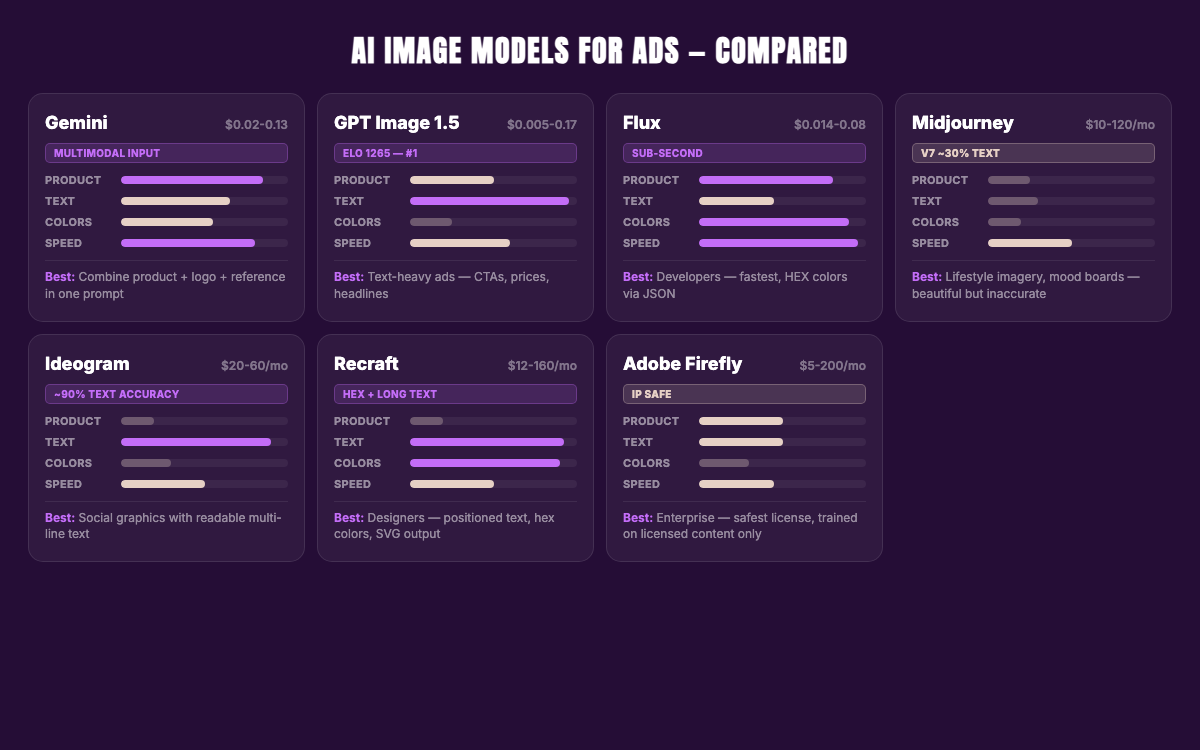
| Model | Product placement | Text rendering | Brand colors | Speed | Cost per image |
|---|---|---|---|---|---|
| Gemini (Imagen 4 / Nano Banana Pro) | Strong — multimodal input combines product + logo + reference | 80% accuracy (Flash), improving | Reference swatches | 1-9s | $0.02-0.13 |
| GPT Image 1.5 (OpenAI) | Moderate — no reference input | Best in class (Elo 1265) | No hex input | 6-8s | $0.005-0.17 |
| Flux (Black Forest Labs) | Strong — Kontext preserves product across scenes | Short words OK, multi-word fails | HEX via JSON | <1s-4.5s | $0.014-0.25 |
| Midjourney (V7/V8 Alpha) | Poor — aesthetic but inaccurate | V8: improved. V7: ~30% accuracy | No hex input | 5-22s | ~$0.03-0.10 |
| Ideogram (v3.0) | Weak | ~90% accuracy, multi-line capable | Limited | — | $20-60/mo sub |
| Recraft (V3) | Weak | Best for long text + positioned text | Native hex palette | — | $12-160/mo sub |
| Adobe Firefly | Moderate (Gen Fill in Photoshop) | Moderate | Limited | Moderate | $5-200/mo sub |
Now let's look at each model in depth.
Gemini (Google) — the multimodal ad engine
Models: Imagen 3 ($0.03/image), Imagen 4 ($0.02-0.06/image), Nano Banana Pro / Gemini 3 Pro Image ($0.134/image)
What makes it different: Gemini is natively multimodal — it generates and edits images conversationally with text and images combined. Feed it a product photo, a logo, and a reference ad in the same prompt. The model understands all three inputs and combines them into a cohesive output. No other model does this as cleanly.
Free tier: ~1,600 images per day across three independent quotas — 100/day through the Gemini App, 500/day through the API, and 500-1,000/day through AI Studio. These don't overlap.
Ad strengths: Multi-turn editing (ask for changes in natural language, context preserved between turns). Nano Banana Pro uses advanced reasoning to follow complex instructions. Became the default model across Google Ads on February 26, 2026. SynthID watermarking for commercial safety.
Ad weaknesses: Text rendering at 80% accuracy on Flash variants — improving but not best-in-class. Some font inconsistency. The newest models (Nano Banana Pro, April 2, 2026) have limited third-party reviews.
Why AdDogs chose it: Gemini's multimodal input — product photo + logo + reference layout in a single generation — makes it the strongest model for ad-specific tasks where you need to combine multiple brand elements into one output.
Midjourney — beautiful images, unreliable ads
Versions: V6.1 (default until June 2025) → V7 (April 2025, complete rebuild, current default) → V8 Alpha (March 17, 2026, opt-in only at alpha.midjourney.com)
Pricing: (full plan comparison)
- Basic: $10/mo ($8/mo annual) — ~3.3 GPU hours
- Standard: $30/mo ($24/mo annual) — ~15 GPU hours
- Pro: $60/mo ($48/mo annual) — ~30 GPU hours
- Mega: $120/mo ($96/mo annual) — ~60 GPU hours
Companies with over $1M gross annual revenue must use Pro or Mega. All paid plans include commercial rights and indemnification — Midjourney covers legal costs if you're sued over copyright issues with generated content. The web app works fully standalone without Discord.
What it excels at: Cinematic lighting, rich textures, aspirational lifestyle imagery. V7's photorealism is virtually indistinguishable from real photography for general scenes. V8 Alpha is ~5x faster with native 2K resolution via the --hd parameter (no upscaling needed) and significantly better prompt adherence for complex compositions.
Where it fails for ads: SCENE4 tested product photography with Midjourney's Omni Reference parameter at high reference strength. The result: garbled text on the Coca-Cola can, altered proportions, wrong colors. V7 delivers roughly 30% text rendering accuracy for short phrases. Products with nutrition info, SKU codes, or brand names come back "garbled, hallucinated, or missing text almost every time." Amazon-standard white backgrounds (RGB 255,255,255) frequently come out off-white.
V8 Alpha improves short phrases on signage and labels — "puts Midjourney ahead of most competitors" for brief text. Multi-word body text and stylized text remain unreliable.
Quote from Nightjar's testing: "For products where the label, logo, or exact geometry matters to the buyer, this is a deal-breaker."
Bottom line: Midjourney makes the best-looking images. It makes unreliable ads. Use it for mood boards and lifestyle campaigns. Don't use it for product ads where accuracy pays the bills.
GPT Image 1.5 (OpenAI) — the text rendering champion
Access: ChatGPT Plus ($20/mo, includes DALL-E 3 + GPT Image), ChatGPT Pro ($200/mo), API ($0.005-0.17/image depending on model and quality tier)
GPT Image 1.5 launched December 16, 2025 and immediately set the benchmark. At an Elo score of 1264 on the Artificial Analysis leaderboard — the highest ever recorded for text-to-image — it renders CTAs, price callouts, product labels, and multi-word headlines more accurately than any other model.
Ad strengths: Best text rendering in the industry. Excellent prompt comprehension — describe what you want in plain English and get close to what you described. Conversational iteration through ChatGPT (generate, then refine in follow-up messages). Massive accessibility — anyone with a $20/mo ChatGPT Plus subscription can use it.
Ad weaknesses: No reference image input for product placement — you describe the product in text, the model reconstructs it from scratch. No HEX color control. ChatGPT Plus has rate limits on image generation. No multi-format export. No ad-specific layout control.
Best for: Generating text-heavy ad mockups where the CTA, headline, or price callout needs to be legible. Creating ad concepts for review before producing the final version in a dedicated tool.
Flux (Black Forest Labs) — fastest and most programmable
Models: FLUX.2 Klein 4B ($0.014/image, sub-second, Apache 2.0), FLUX.2 Pro ($0.03/image), FLUX.2 Max ($0.07/image, Elo 1201 — top 5 on Artificial Analysis leaderboard), FLUX.1 Kontext Pro ($0.04/image, instruction-based editing), FLUX.1 Kontext Max ($0.08/image)
Flux operates on a credit system: 1 credit = $0.01. Same pricing for API and Playground. Open-weight dev models available for self-hosting.
What makes it different for ads: Two capabilities no other model matches.
First, Flux Kontext (released May 2025) does instruction-based image editing. Feed it an existing image, give a text instruction ("put this product on a kitchen counter with morning light"), and it modifies the image while preserving product accuracy and visual consistency across scenes. The closest any raw model gets to "clone and modify."
Second, FLUX.2 supports native HEX color codes via JSON structured prompting. Specify your exact brand palette programmatically and get consistent results across hundreds of generations. Recraft is the only other model with comparable brand color control.
Ad strengths: Sub-second generation (Klein 4B), HEX color control, Kontext for reference-based editing, open-weight options for self-hosting, flexible pricing from $0.014 to $0.08 per image. FLUX.2 Max ranks 5th on the Artificial Analysis leaderboard with an Elo of 1201.
Ad weaknesses: Text rendering is mediocre — short words work, multi-word phrases frequently produce errors. No consumer-friendly interface. Premium models get expensive at scale. Requires technical knowledge to use effectively.
Best for: Developers building ad creation pipelines. Teams that need programmatic brand color control at scale. Product visualization workflows using Kontext's reference-based editing.
Ideogram — the text specialist
Pricing: Free (10 slow generations/week), Plus ($20/mo or $15/mo annual, 1,000 priority credits), Pro ($60/mo or $42/mo annual, 3,500 priority credits), Team ($30/member/mo or $20/member/mo annual).
Built by a team from Google Brain and the University of Toronto. Ideogram 3.0 launched March 26, 2025 with style references (up to 3 images) and significantly improved photorealism.
Ideogram was built from day one to solve one problem: putting readable text into AI-generated images. At ~90% text accuracy on multi-line compositions, it was the first model to make typography in AI images usable — and held the lead until GPT Image 1.5 arrived.
Ad strengths: Renders accurate, readable text on posters, social media graphics, logos. Handles complex multi-line compositions. The Plus plan at $20/mo ($15/mo annual) includes 1,000 priority credits.
Ad weaknesses: Weak product placement — can't take your real product photo and position it in a scene. Smaller community and ecosystem than Midjourney or Stable Diffusion. No reference-image editing comparable to Flux Kontext.
Best for: Creators who need text-heavy social graphics, promotional banners with readable headlines, or event posters. Not for product-specific ads.
Recraft — the designer's model
Pricing: Free (50 daily credits, public + non-commercial only), Basic ($12/mo or $10/mo annual, 1,000 credits), Pro 2K ($20/mo), Pro 4K ($40/mo), up to Pro 16K ($160/mo). All paid plans include private generation and commercial rights.
Recraft V3 hit #1 on the Artificial Analysis Text-to-Image Leaderboard in October 2024 with an Elo of 1172. It's since been overtaken — GPT Image 1.5 (Elo 1265), Nano Banana 2 (Elo 1256), and FLUX.2 Max (Elo 1201) now lead the leaderboard. Recraft's strength was never raw image quality — it was design-first features.
What makes it unique for ads: Three capabilities no other model combines.
- Positioned text placement. Not just accurate text rendering — Recraft places text at specific positions within the image. The only model that can render paragraphs, not just words.
- Native HEX color input. Specify your exact brand palette through the color control tool. No JSON workarounds, no reference swatches — direct hex codes.
- Custom brand style training. Upload your brand assets and train the model to generate content matching your visual identity.
Recraft also generates native SVG vector files directly from prompts — not raster-to-vector conversion but actual vector output. Useful for logos, icons, and scalable ad elements.
Ad weaknesses: No product placement from reference photos — the product has to be described, not shown. Smaller user base means fewer tutorials and community resources. No ad-specific workflow (multi-format export, layout templates, etc.).
Best for: Designers creating branded ad graphics where typography, brand colors, and design precision matter more than photorealistic product placement.
Adobe Firefly — the safest commercial bet
Pricing: Free (25 credits/mo), Firefly Premium ($5/mo, 100 credits), Standard ($9.99/mo), Pro ($19.99/mo), Creative Cloud All Apps ($60/mo, 1,000 credits).
The differentiator is legal, not visual. Adobe Firefly is trained exclusively on Adobe Stock images, openly licensed content, and public domain material. No scraped internet data. No copyright gray areas. Enterprise customers get IP indemnification — Adobe covers legal costs if generated content triggers copyright claims.
Ad strengths: Safest commercial licensing in the industry. Deep Photoshop and Illustrator integration (Generative Fill, Generative Expand). Text-to-Vector in Illustrator for scalable ad elements. Enterprise trust and compliance.
Ad weaknesses: Image quality generally lags behind Midjourney, Flux, and Gemini. Credit-based system gets expensive at scale. Locked into the Adobe ecosystem. Slower iteration compared to API-first models.
Best for: Enterprise brands and agencies where legal safety is the top priority. Teams already in the Adobe ecosystem who want AI generation inside Photoshop. Regulated industries where IP provenance matters.

Create your own product product ads
Create your ad
Best AI image generators for ads — by use case
The right tool depends on what kind of ads you make, how many you need, and what you're willing to spend on post-production. Finding the best AI image generator for ads means matching the tool to your use case — not picking the highest-rated model on a generic leaderboard.
Best for cloning proven ads — AdDogs
Approach: Pick a reference ad from the 14,000+ ad examples library (or upload any ad you've spotted in the wild). Upload your product photo. The AI rebuilds the ad with your product, extracting your brand colors automatically. Finished in seconds. Pick your dimension: 3 on Basic (square 1:1, portrait 9:16, landscape 16:9), all 14 on Pro and Ultimate.
Why it works for ads specifically: The reference ad already proved it converts — someone spent money running it. The AI's job isn't to invent a layout from a blank prompt. It's to recreate a proven one with your product swapped in. No prompt engineering. No multi-attempt iteration. No 45-minute post-production workflow.
Pricing: Basic: $12/mo for 30 credits ($0.40/ad). Pro: $33/mo for 100 credits ($0.33/ad). Ultimate: $63/mo for 212 credits ($0.30/ad). See all paid plans.
Runs on: Gemini — chosen after internal benchmarking against Midjourney, DALL-E, and Flux for ad-specific generation tasks.
Best for AI product photography — Flair ($10-55/mo) and Pebblely ($19-39/mo)
If you need product photography — hero shots, lifestyle scenes, white-background shots for listings — these tools are purpose-built. Product photography AI has matured fast, and these two lead the category.
Flair ($10-55/mo) lets you upload your actual product photo and drag-and-drop it into AI-generated scenes. Custom model training on your specific products. The product stays accurate because you're providing the real image — the AI generates the context around it.
Pebblely ($19-39/mo, free tier: 40 images/month) takes a simpler approach. Upload your product, the AI removes the background and generates lifestyle scenes. Batch processing for up to 25 products. Shopify integration.
Limitations: Flair has product fidelity issues on complex items. Orbitvu tested perfume bottles and found "branding was altered, the shape was changed, and the color of the fragrance was different." Pebblely has limited templates and caps at 1024x1024 on the free tier.
The e-commerce signal: Zalando jumped from 22% to 38% AI-generated product images in a single year. AI product photography is moving from experiment to standard practice.
Neither is an ad tool. Both generate product images, not finished ads. You still need to add text, apply brand elements, resize for platforms, and export. They solve the image generation step but not the workflow gap.
Best for text-heavy ad creatives — Ideogram ($20-60/mo) and Recraft ($12-160/mo)
If your ads depend on readable text — "50% OFF," "FREE SHIPPING," "Shop Now" — most image generators will ruin them. Two models stand apart.
Ideogram ($20-60/mo, or $15-42/mo annual) achieves ~90% text accuracy on multi-line compositions. Built by ex-Google Brain researchers specifically to integrate typography into visuals.
Recraft ($12-160/mo) is the only model that can place text at specific positions and render paragraphs, not just words. It supports native hex color input and custom brand style training — design-first features no other model matches.
Both produce high-quality images with readable text. Neither produces finished ads. The post-production workflow still applies.
Best free option — Canva Magic Studio + Google Ads Asset Studio
Canva Magic Studio is free (with Pro features at $13/mo). Magic Design generates image variations from text prompts. The output is decent for quick social graphics. Limitation: you're designing manually — selecting elements, positioning text, adjusting layouts. Budget-friendly but time-expensive. At 30-60 minutes per ad, the "free" tool costs you in hours. (How AdDogs compares to Canva for ad creation.)
Google Ads Asset Studio is free and built into Google Ads. Powered by Imagen 4. We cover it in detail in its own section below — the short version: useful for generic backgrounds, but text rendering is broken and quality lags behind third-party generators.
Best for lifestyle and aspirational campaigns — Midjourney ($10-120/mo)
Midjourney produces the most aesthetically striking images of any model. Cinematic lighting, rich textures, editorial-grade composition. For aspirational brand campaigns, mood boards, and lifestyle imagery, nothing else comes close.
What it can't do: Place your specific product accurately. Render multi-word text reliably. Match exact brand colors (no hex input). Export in ad-ready formats.
What it costs at scale: The Standard plan ($30/mo) gives ~15 GPU hours. Each generation uses a fraction of an hour, making per-image cost roughly $0.03-0.10. But the cost per usable ad is much higher — factor in 3-5 prompt iterations per usable output, plus the post-production workflow (resizing, text overlays, branding) for each finished ad.
Best for: creative directors building brand mood boards. Agencies shooting for aspirational lifestyle imagery. Not for a dropshipper who needs 30 product ads by Tuesday.
Best raw model for developers — Flux ($0.014-0.25/img)
Flux is the engine, not the car. If you're building an ad tool (or want maximum control over your generation pipeline), Flux offers the best speed-to-quality ratio at the API level.
FLUX.2 Klein 4B generates sub-second images at $0.014 each under an Apache 2.0 license — runs on consumer hardware with just 8.4 GB VRAM. FLUX.1 Kontext ($0.04-0.08/image) does instruction-based image editing that preserves product accuracy across scenes — the closest any raw model gets to "clone and modify." HEX color support via JSON structured prompting. Open-weight dev models for self-hosting.
Not consumer-facing. Built for developers building ad creation pipelines, not marketers running campaigns.
Google Ads AI image generator — worth using?
Google Ads Asset Studio is free, integrated into every Google Ads account, and powered by Imagen 4. On February 26, 2026, Gemini 3.1 Flash Image became the default across Google Ads, Google Search AI Mode, Google Lens, and other Google surfaces.
What it does well: Generate generic product lifestyle images. Edit existing images with natural language ("make the background warmer"). Apply brand guidelines (HEX colors, fonts) to autogenerated YouTube and responsive display ads.
Where it falls short:
- Text rendering is unreliable — CTAs, discount callouts, and product names get garbled
- Image quality consistently lags behind Midjourney and other third-party generators
- Google's own testing shows a 25-40% performance gap versus manually-created creative
- Brand guidelines only apply to a subset of ad formats, not universally
- You need 30+ days of active account history before the tool unlocks
- No template library, no reference-based generation, no ability to clone a competitor's ad layout
When to use it: Quick product backgrounds for Google Shopping campaigns. Testing image variations in Performance Max without leaving the Google Ads interface.
When to skip it: Branded ads with text overlays. Product launches where the creative needs to match your brand precisely. Any campaign where you need the ad to look indistinguishable from a professionally designed piece. For those, a purpose-built tool or a raw model with better output quality will produce stronger results. (Full ad size specs for every platform.)
Cost per ad with every AI image generator — from free to $2,500
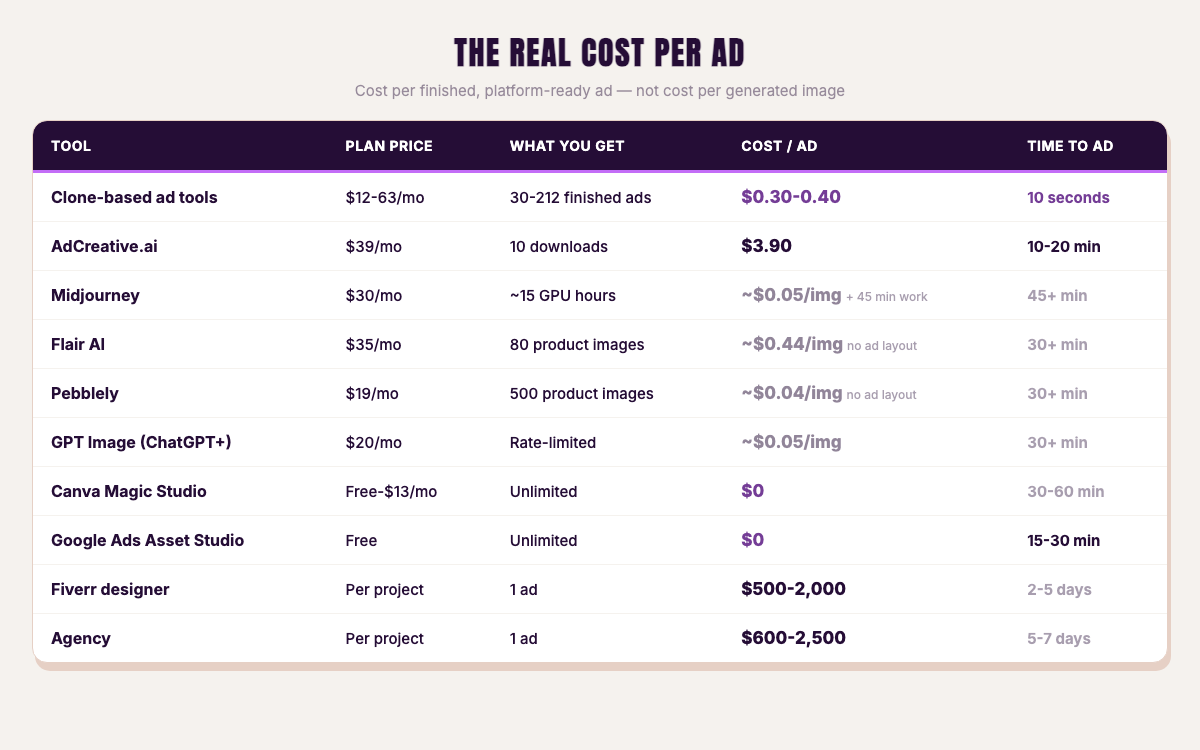
Every tool publishes a price per image or a monthly subscription. None of them publish the number that actually matters: the cost per finished, platform-ready ad — including the time you spend on post-production.
| Tool | Price | What you get | Cost per usable ad | Time to finished ad |
|---|---|---|---|---|
| AdDogs Pro | $33/mo | 100 ads per month, any dimension | $0.33 | seconds |
| AdDogs Basic | $12/mo | 30 ads | $0.40 | seconds |
| AdCreative.ai Starter | $39/mo | 10 downloads | $3.90 | 10-20 min (selection + export) |
| Pebblely Starter | $19/mo | 500 images | ~$0.04/image | 30+ min per ad (image only, no layout) |
| Flair Pro+ | $35/mo | 80 images | ~$0.44/image | 30+ min per ad (image only, no layout) |
| Midjourney Standard | $30/mo | ~15 GPU hrs | ~$0.05/image | 45+ min per ad (prompt + post-production) |
| GPT Image (ChatGPT Plus) | $20/mo | Rate-limited | ~$0.05/image | 30+ min per ad |
| Canva Magic Studio | Free-$13/mo | Unlimited | $0 | 30-60 min per ad (manual design) |
| Google Ads Asset Studio | Free | Unlimited | $0 | 15-30 min (limited controls) |
| Fiverr designer | Per project | 1 ad | $500-2,000 | 2-5 days |
| Agency | Per project | 1 ad | $600-2,500 | 5-7 business days |
The cost per image and the cost per ad are different numbers. Midjourney generates an image for $0.05. But the finished ad — with your brand, your CTA, your product positioned correctly, exported in three platform formats — costs you $0.05 plus 45 minutes of your time. At any reasonable hourly rate, that "cheap" image becomes an expensive ad.
AdDogs Pro: $0.33 per finished ad, seconds, done. AdCreative.ai Starter: $3.90 per download, plus 10-20 minutes of selection and export. The full AdDogs vs AdCreative.ai breakdown covers the pricing gap in detail — at 100 ads/month, it's $33 vs $999.
For a dropshipper testing 20 products with 3 variations each — 60 ads — the math is:
- AdDogs Pro: $33/month, under 15 minutes total
- Midjourney Standard + manual post-production: $30/month subscription + ~30-45 hours of resizing, branding, and text work
- Fiverr freelancer: $6,000-12,000 at $100-200 per ad, plus 2-4 weeks turnaround
The tool price is a rounding error. The workflow cost is the real expense. (See how static ads compare to video ads for more on why production speed determines testing velocity.)
FAQ
What is the best free AI image generator for ads?
Google Ads Asset Studio is free and built into your Google Ads account. Gemini's free tier gives ~1,600 images per day across independent API, App, and AI Studio quotas. Canva Magic Studio is free with limited features. For finished ads (not raw images), AdDogs is paid-only, starting at $12/month for 30 complete, branded ads.
Can Midjourney make good product ads?
Midjourney makes stunning lifestyle and aspirational imagery. It cannot reliably render your specific product with accurate labels, text, and proportions. V7 testing showed ~30% text accuracy and garbled product packaging. V8 Alpha improves short text but still fails on multi-word labels. For product ads where accuracy matters, use a tool that takes your actual product photo as input rather than reconstructing it from a prompt.
What AI model does Google Ads use for image generation?
Google Ads Asset Studio uses Imagen 4 for image generation. Gemini 3.1 Flash Image became the default model across Google Ads and other Google surfaces on February 26, 2026. Google Nano Banana Pro (Gemini 3 Pro Image) launched April 2, 2026 for professional-grade generation.
How much does it cost to create ads with AI in 2026?
Raw image generation costs $0.005-0.25 per image depending on the model. But generating an image isn't the same as creating an ad. A finished, platform-ready ad costs $0.33 with AdDogs (seconds), $3.90 with AdCreative.ai (10-20 minutes), or $500-2,500 with a freelancer or agency (days). The variable that matters most isn't the AI model price — it's the post-production time.
Is AI product photography good enough for e-commerce ads?
Getting there fast. Zalando went from 22% to 38% AI-generated product images in one year. The AI-versus-human conversion gap narrowed from 15% to 8% in 2025-2026. Below $100 average order value — the bracket most e-commerce products fall into — AI-generated creative already matches or exceeds human-designed ad performance on Meta. For product ads on Instagram, Facebook, and TikTok, AI product photography is no longer experimental. It's standard.
The model matters less than the workflow. Midjourney at $30/month plus 45 hours of post-production, or AdDogs at $33/month and done before your coffee cools. Open AdDogs. Upload a product photo. Pick an ad example from the library. Three ad formats, seconds, $0.33.


