AdDogs & Canva for ad creation


It's 11 PM. You've been in Canva for 45 minutes. One Facebook ad. You're still nudging a text box 2 pixels left, second-guessing the font, wondering if that shade of blue matches your brand. Then you remember: you still need an Instagram Story version. And a Google Display banner. That's two more rounds of the same thing.
AdDogs does each of those in seconds.
Canva is a great design tool — 260 million people use it for good reason. But Canva is a design platform. AdDogs is an ad generator. They solve different problems. Here's what that means in practice.
Different tools for different jobs
Canva gives you a blank canvas and says "design something." AdDogs gives you a proven ad and says "who's your product?"
Canva's 4.5 million templates span everything from birthday invitations to restaurant menus to pitch decks. It's a general design platform, and a good one. A subset of those templates are ads. They're designed to look good in a template gallery so you click "Use this template."
AdDogs has 14,000+ ad examples. Every one is pulled from a real ad campaign — skincare brands, DTC supplements, fashion labels, electronics. Ads that actually ran on paid social. You're not starting from a graphic designer's idea of what an ad looks like. You're starting from what already ran.
If you need to design a pitch deck, a social media graphic, and a restaurant menu this week — Canva. If you need 20 product ads for Facebook and Instagram — AdDogs.
How each one works
Let's count the steps.
Creating an ad in Canva:
- Open Canva, click "Create a design"
- Choose your ad dimensions (Facebook Ad? Instagram Story? Google Display?)
- Browse templates. Scroll. Scroll more. Pick one
- Delete placeholder images
- Upload your product photo
- Position and resize your product in the frame
- Edit the headline text
- Edit the body copy
- Change the colors to match your brand
- Adjust the font — does this look right? Try another one
- Align everything. Nudge that text box again
- Export
- Now do it again for the next ad size
A beginner spends 45-60 minutes on this. An experienced Canva user still spends about 20 minutes per ad. And that's for one ad in one format.
Creating an ad in AdDogs:
- Pick a reference ad (from the ad example library or upload any ad you want to clone)
- Upload your product photo
- Click generate
seconds later you have a finished ad. No dragging, no dropping, no font decisions, no alignment nudging. The AI analyzes the reference ad's layout, style, and composition, then recreates the design with your product swapped in. Your brand colors and logo are extracted automatically from your uploaded assets and applied to the output.
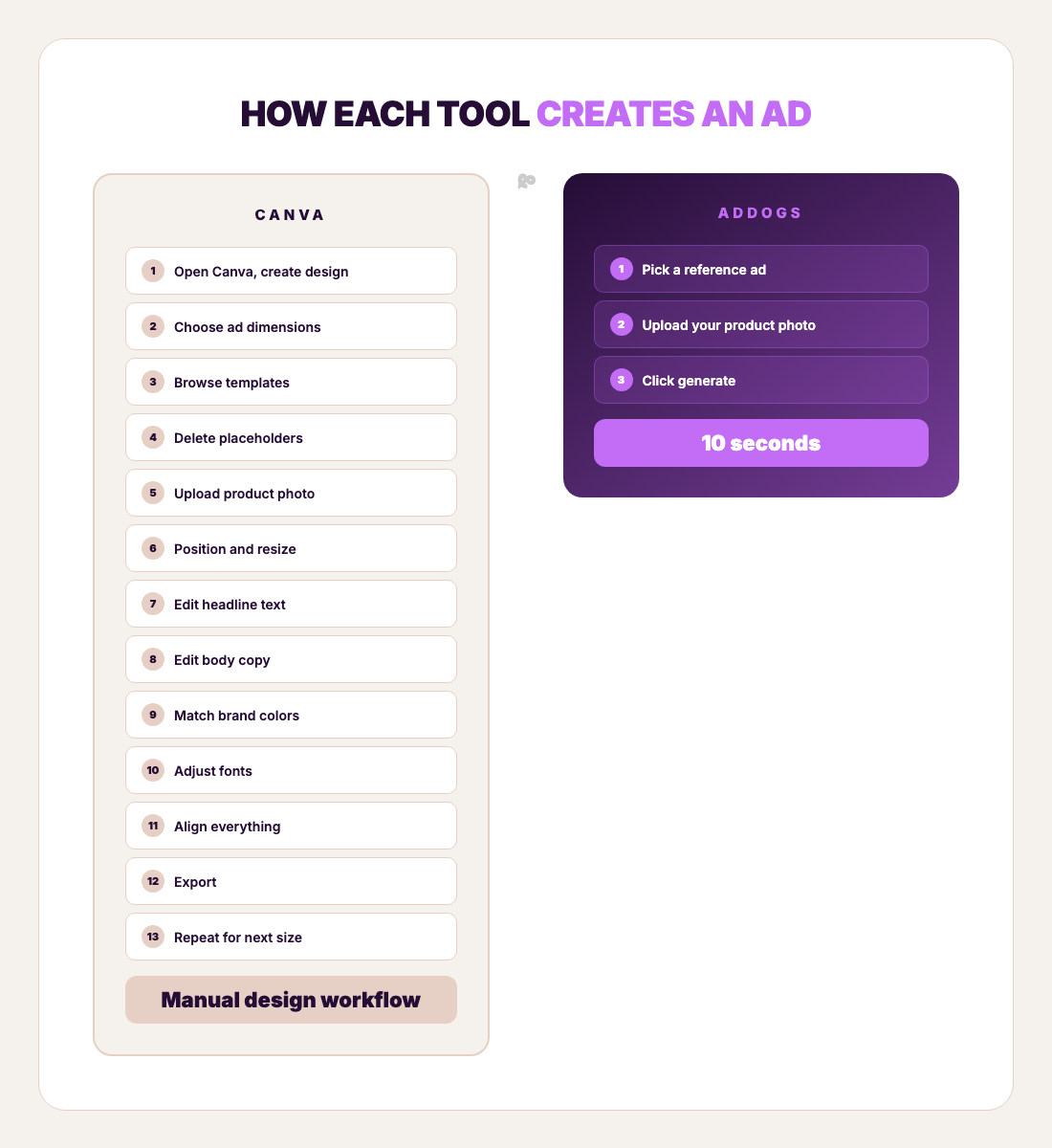
13 steps vs 3. 20 minutes vs seconds. Those are the numbers for one ad. Here's what it looks like at volume:
| Canva (20 min/ad) | AdDogs (10 sec/ad) | |
|---|---|---|
| 1 ad | 20 minutes | seconds |
| 5 ads | 1 hr 40 min | 50 seconds |
| 20 ads | 6 hr 40 min | 3 min 20 sec |
| 30 ads | 10 hours | 5 minutes |
At 30 ads per month, Canva takes 10 hours of hands-on design work. AdDogs takes 5 minutes.
Pricing
No tricks here. Just the tool prices.
| Canva Free | Canva Pro | AdDogs Basic | AdDogs Pro | |
|---|---|---|---|---|
| Monthly price | $0 | $15/mo | $12/mo | $33/mo |
| Annual price | $0 | $120/yr | $120/yr | $330/yr |
| Ad output | Unlimited (manual) | Unlimited (manual) | 30 credits | 100 credits |
| Brand Kit | 3 colors only | Full (manual setup) | Automatic extraction | Automatic extraction |
| Multi-format | Manual resize | Magic Resize | 1 credit per format | 1 credit per format |
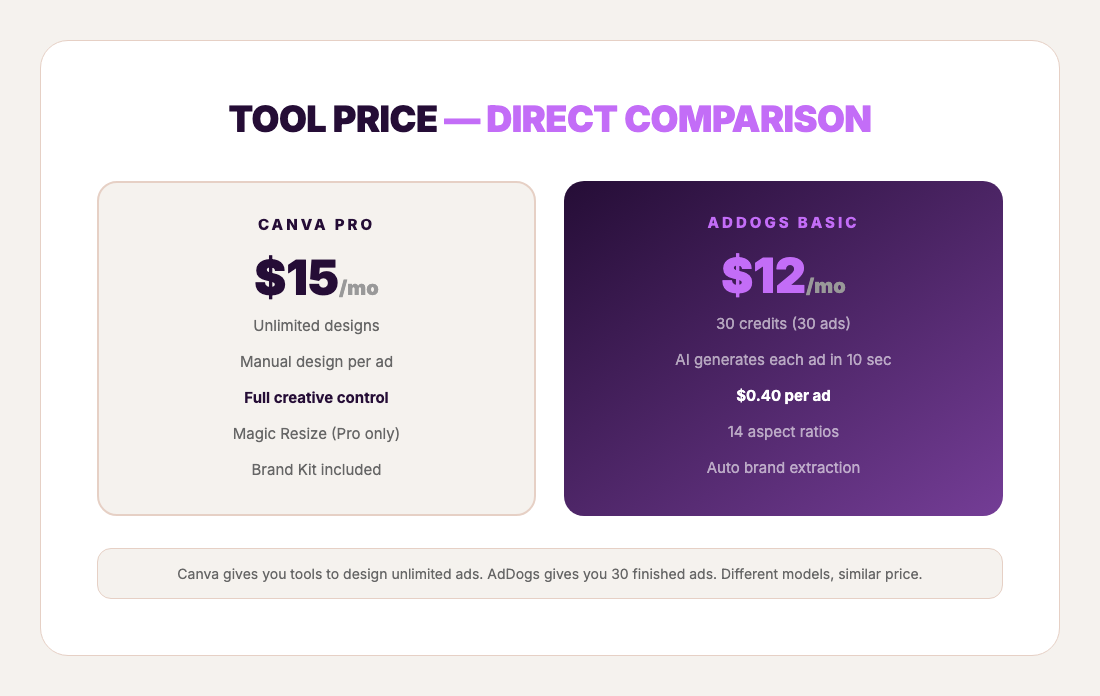
Canva Pro: $15/mo. AdDogs Basic: $12/mo. AdDogs is $3/mo cheaper and purpose-built for ads.
The real difference isn't the sticker price — they're in the same ballpark. The difference is what the tool does with your time. Canva asks you to design each ad manually. AdDogs generates it from a reference in seconds. Same budget. Radically different time commitment. Either way, the tool only handles one line of what Facebook ads actually cost when you add creative — media, tools, and platform fees are separate.
One credit in AdDogs = one ad generation in one format. If you want your ad in square (1:1) and portrait (9:16), that's 2 credits. No hidden math.
The volume test: 20 ads in one session
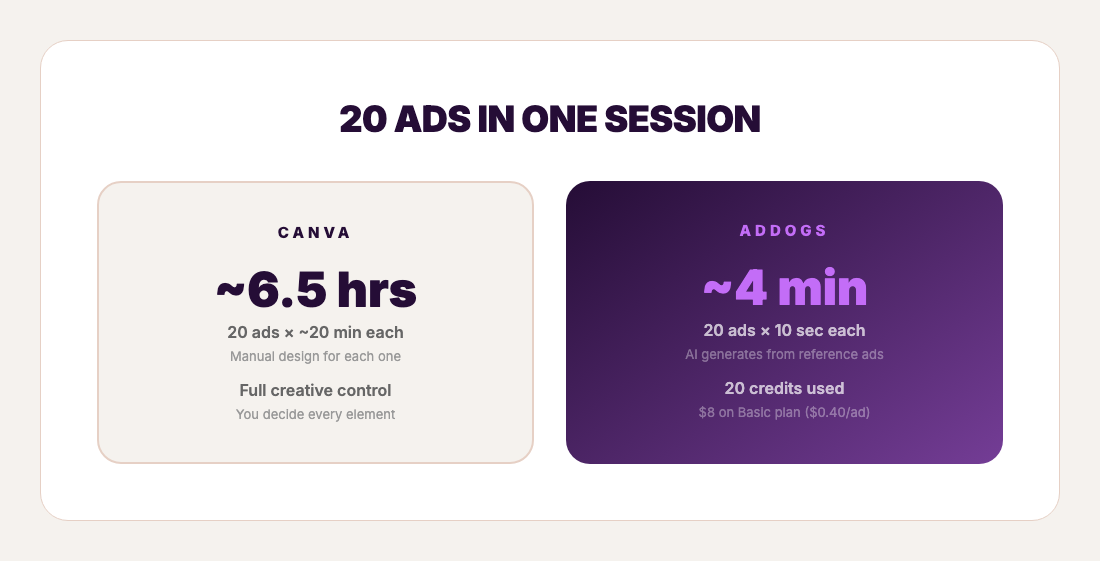
A Shopify store has 5 new products to test this week. Each product needs 4 ad variations to split-test different styles. That's 20 ads.
In Canva: Find a template for product #1. Customize — swap the image, adjust the text, change colors. About 20 minutes. Repeat for variations #2, #3, and #4. That's 80 minutes for one product. Five products: roughly 6.5 hours of design work.
In AdDogs: Pick 4 templates from the ad example library for product #1. Upload the product photo. Generate all 4. Time: about 40 seconds. Repeat for products #2 through #5. Total time: under 4 minutes. 20 credits used.
20 ads. Under 4 minutes. $12/month.
Formats: pick your ratio
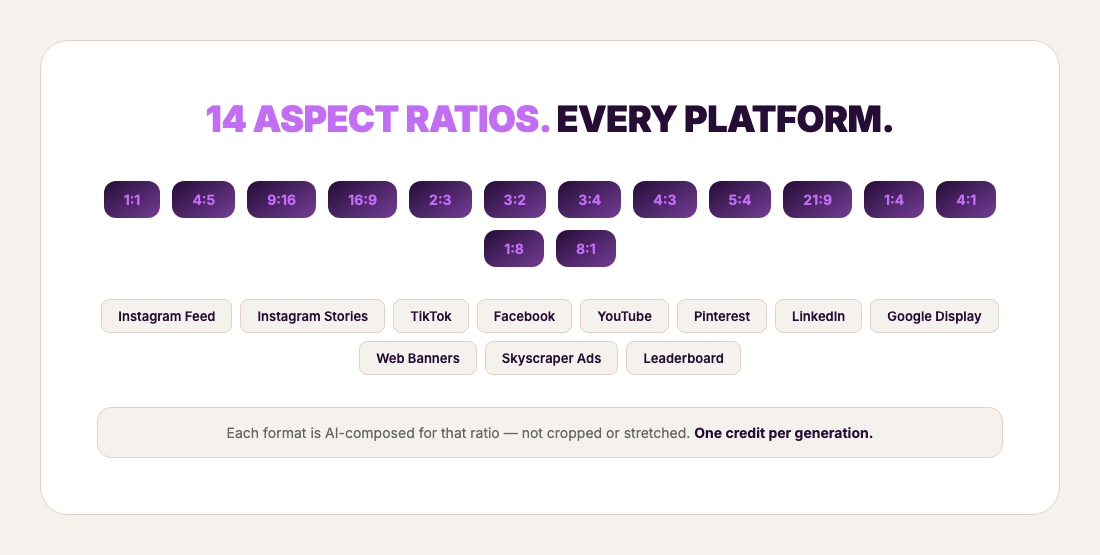
Instagram feed: 1:1. Instagram Stories and TikTok: 9:16. Facebook feed and YouTube: 16:9. Pinterest: 2:3. Each platform wants a different aspect ratio, and a layout that works at 1:1 doesn't automatically work at 9:16.
Canva Pro has Magic Resize, which converts one design to multiple sizes. It works — it changes the canvas dimensions and repositions elements. For many designs, that gets you close enough. You may need to tweak a few things after resizing, but it's a real time-saver compared to rebuilding from scratch.
AdDogs supports 14 aspect ratios — from 1:1 (Instagram Feed) to 9:16 (TikTok/Stories) to 16:9 (YouTube) to 4:5 (Instagram), 2:3 (Pinterest), 21:9 (cinematic), and banner formats like 4:1 and 8:1 for web display. Each generation composes the ad for the chosen ratio from scratch — the AI handles layout, not just scaling. One credit, one ad, one format, seconds.
The tradeoff: Canva's Magic Resize gives you one design adapted to multiple sizes from one starting point. AdDogs generates a fresh composition per ratio, which means each one is purpose-built for its dimensions — but each one costs a credit.
Brand management: manual setup vs automatic extraction
Canva's Brand Kit is a real feature. You upload logos, set brand colors, choose fonts. On Pro, you get the full kit. On Free, you get 3 colors and that's it. Once your Brand Kit is set up, it saves you from memorizing hex codes and hunting for your logo file every time.
The catch: you still apply it manually. Every template, every time. Open a new design, switch the colors, swap the logo, change the fonts. Brand Kit is a reference panel, not an auto-apply button.
AdDogs handles brand differently. Upload your product photo or logo once. The AI extracts your brand colors automatically using color analysis. Every ad you generate after that uses your colors and logo without you doing anything. No setup step. No hex codes. No manual application per ad.
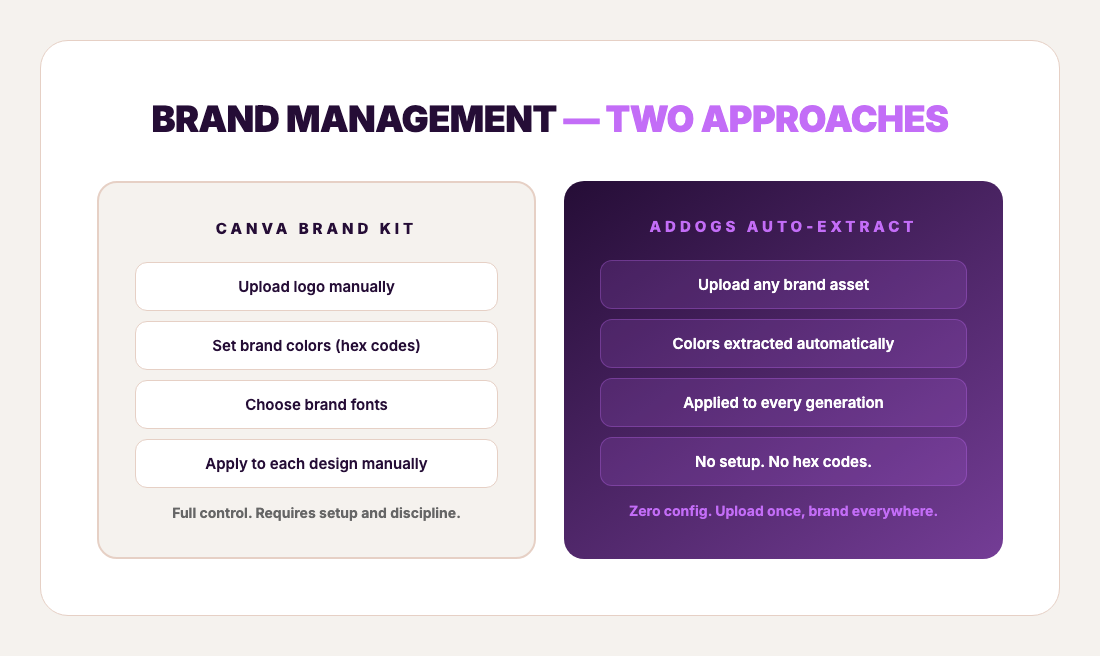
Canva's approach gives you more control — you pick exact fonts, exact colors, exact logo placement. AdDogs' approach gives you more speed — the AI handles it all, every time, automatically.
If brand precision down to the font and spacing matters (and for many brands it does), Canva's Brand Kit gives you that control. If getting your brand colors and logo into every ad without manual work is the priority, AdDogs handles it out of the box.

Create your own product product ads
Create your ad
Templates: 4,000 curated vs 4.5 million general
Canva has 4.5 million templates. That's an extraordinary number — but it includes everything from resumes to wedding invitations to restaurant menus. The ad-specific subset is a fraction of that, and they're designed for visual appeal in a template gallery.
AdDogs has 14,000+ templates. Smaller number, different curation strategy. Every template is sourced from a real ad campaign — ads that brands actually spent money to run on paid social. The filter isn't "does this look nice in a gallery." The filter is "did a brand run this as a paid ad."
4.5 million general templates vs 4,000 ad-specific templates. Depends on what you're making. (For a deeper comparison with AI ad tools, see AdDogs vs AdCreative.ai.)
When to use which
Canva is the better choice when:
You need non-ad design work. Presentations, pitch decks, social graphics, event invitations — Canva handles all of it. AdDogs only makes ads.
You want pixel-level creative control. If you have a specific vision and the design skill to execute it, Canva lets you move every element exactly where you want it. (If you want even more control, Figma is the designer's choice.) AdDogs' AI makes the design decisions for you.
You need team collaboration. Multiple people editing the same design, leaving comments, sharing feedback in real time. AdDogs is a solo workflow.
You already have design skills and enjoy the process. Canva is genuinely fun to use if you like design. AdDogs removes the design step entirely — which is the point for some people and a downside for others.
AdDogs is the better choice when:
You need product ads specifically. Ads for Instagram, Facebook, TikTok, Google — AdDogs is purpose-built for exactly this. 3 steps. seconds.
You're testing at volume. 10 different ad layouts for the same product? In Canva, that's about 3 hours of design. In AdDogs, that's under 2 minutes. Pick 10 templates from the ad example library, upload your product once, generate all 10.
You don't have design skills. Canva is easier than Photoshop, but it still requires an eye for layout, color, and typography. AdDogs removes that requirement — the reference ad already has a layout that worked.
You value speed over control. Every minute in Canva is a minute not spent on product sourcing, ad copy, audience targeting, or the other things that determine whether your ads actually convert.
Who benefits most from AdDogs
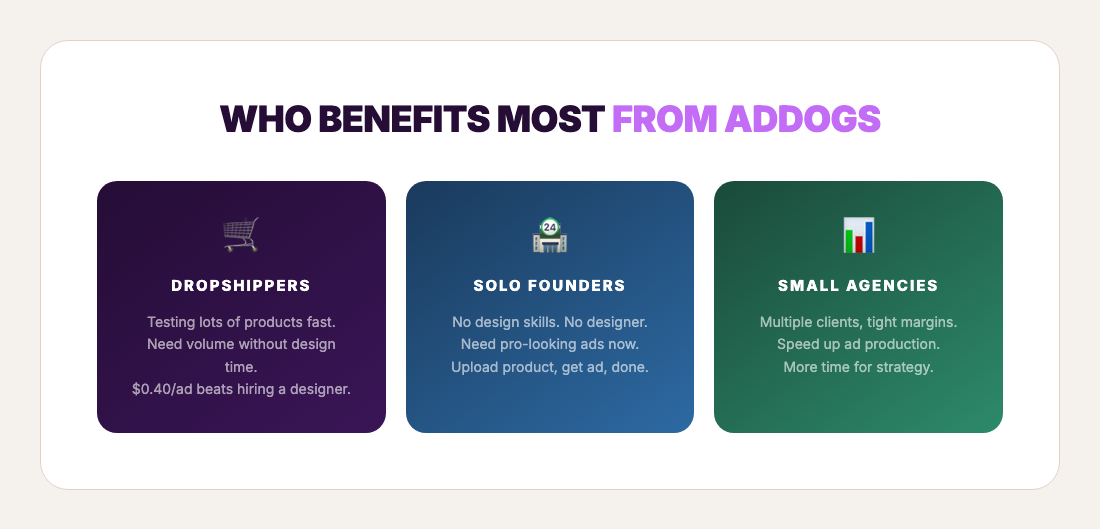
Dropshippers and product testers cycling through products fast. If you're testing 10-50 products a month with multiple ad variations each, the time math in Canva becomes untenable. AdDogs lets you generate dozens of ad variations in minutes instead of hours.
Solo e-commerce founders without design skills or a designer on call. Getting from product photo to finished ad without learning design software is the core value.
Small agencies producing ads across multiple clients. Each client's brand colors are extracted automatically — no brand kit switching, no template folder management.
The comparison at a glance
| Canva Pro | AdDogs Basic | |
|---|---|---|
| Price | $15/mo | $12/mo |
| Time per ad | ~20 min (experienced) | seconds |
| Steps per ad | 13 | 3 |
| Brand setup | Manual (upload, configure, apply each time) | Automatic (upload once, applied every time) |
| Supported formats | Standard sizes + Magic Resize | 14 aspect ratios (AI-composed per ratio) |
| Design skill needed | Some | None |
| Template source | 4.5M general templates | 14,000+ from real ad campaigns |
| Best for | General design + ads with creative control | High-volume product ads at speed |
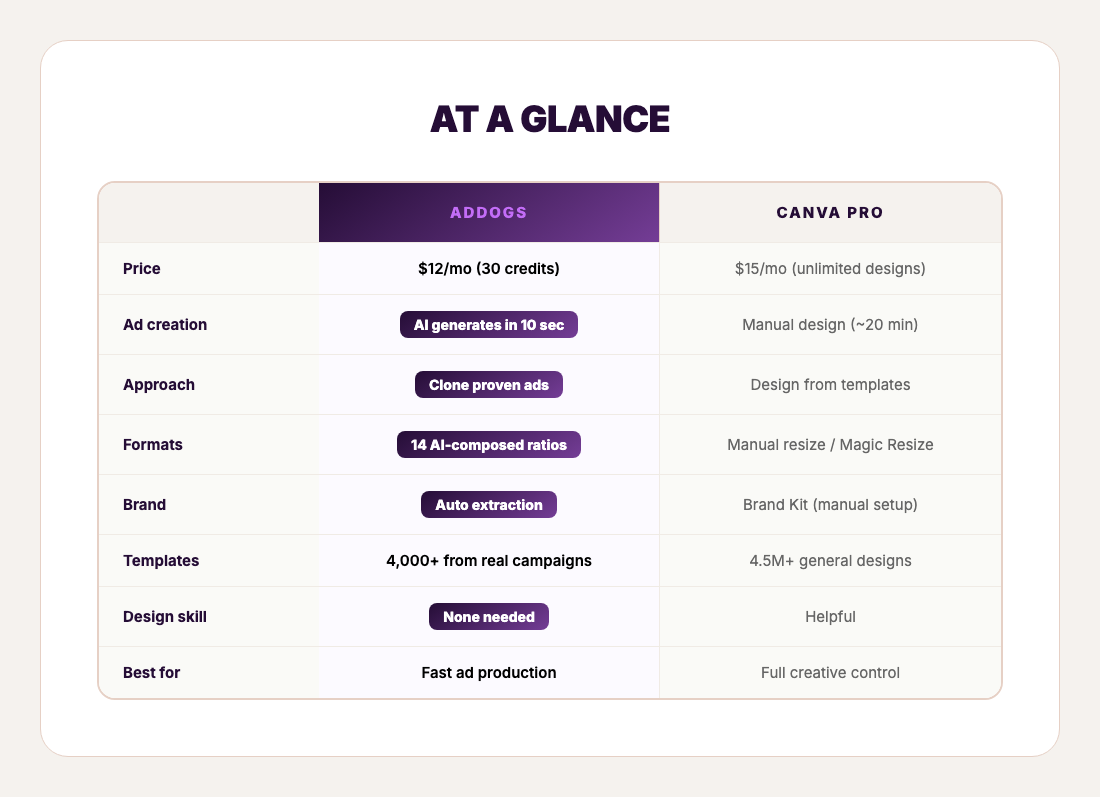
Canva is a design tool that can make ads. AdDogs is an ad tool that skips the design.
$15/month for Canva Pro. $12/month for AdDogs Basic. Similar price. Completely different workflow. One asks you to design. The other does it in seconds.
If you're curious what seconds feels like, AdDogs plans start at $12/month for 30 finished ads. Pick any ad from the library. Upload your product photo. Count to ten.
FAQ
Can I use Canva and AdDogs together?
Yes. Generate your base ad in AdDogs in seconds, then import it to Canva if you want to add custom text overlays or tweak specific elements. Speed of AI generation plus Canva's editing flexibility. Most users don't need the extra step, but it's there.
Is Canva free for ad creation?
Canva Free lets you create ads at no cost, but you lose key features: no Magic Resize (you manually remake each ad size), no Background Remover, no Brand Kit beyond 3 colors, and no premium templates. Canva Pro at $15/month unlocks these. AdDogs Basic is $12/month for 30 ad generations that take seconds each.
How many ad templates does Canva have vs AdDogs?
Canva has 4.5 million+ templates across all categories — resumes, invitations, social posts, ads, and more. AdDogs has 14,000+ ad examples, all sourced from real ad campaigns. Different strategies: breadth vs ad-specific curation.
Does Canva have AI ad generation?
Canva's Magic Studio includes AI tools like Magic Design (template generation from prompts) and Magic Media (text-to-image). They work from text descriptions — you tell the AI what you want. AdDogs works from visual references — you show it an ad you want to clone, and it recreates the layout with your product. Text-based generation vs reference-based cloning.
What's faster for making product ads: Canva or AdDogs?
AdDogs is significantly faster. A Canva ad takes about 20 minutes for an experienced user (longer for beginners). An AdDogs ad takes seconds. For 30 ads, that's roughly 10 hours in Canva vs 5 minutes in AdDogs. Both produce finished, export-ready ads.
Can AdDogs replace Canva entirely?
For product ad creation, yes. For other design work — presentations, social media graphics, documents, anything that isn't a product ad — no. Canva is a general design platform. AdDogs does one thing: product ads. Most AdDogs users keep Canva for non-ad design and use AdDogs for ad creative.