Best Canva alternatives for ads in 2026: 7 ad-built tools worth using


Best Canva alternatives for ads in 2026: 7 ad-built tools worth using
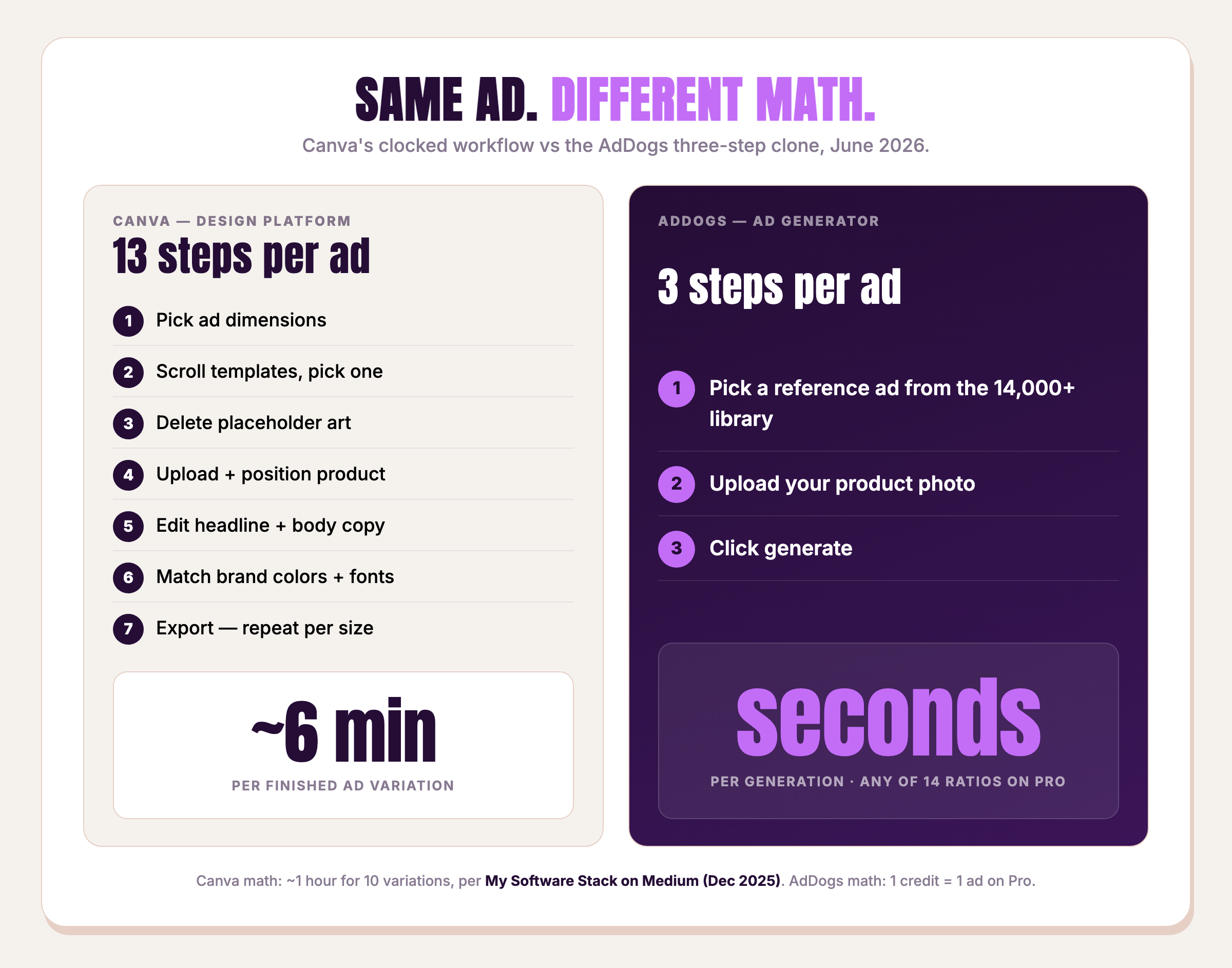
Canva is a strong general design platform. It's also the slowest tool on the page when the job is "ship 10 ad variations before lunch." One operator running the math on Medium clocked about an hour to produce 10 Canva ad variations — 45 of those minutes spent tweaking fonts, matching hex codes, and aligning the logo. That's six minutes per variation, every time.
Canva is good. For ads, it's the wrong tool — because Canva alternatives for ads are a different category from Canva alternatives for presentations. Seven tools earn the comparison here. Each is scored against six ad-specific criteria, every price re-verified or triangulated on 2026-06-27. The table sits below.
Why Canva isn't built for ads (the structural problem)
Canva was designed for general visual creation — birthday invitations, pitch decks, school posters, and social tiles. It does that job well. The structural mismatch shows up when the goal stops being "make one nice graphic" and starts being "test 30 product hooks against a Meta audience this week."
Three patterns repeat in named reviewer testimony. Capterra reviewer Kimberly B., a retail co-owner who left a review on March 11, 2026, wrote that "Canva is entirely too complex. It makes the simplest tasks (like cropping an image) nearly impossible to do well." Same review page, April V., a real-estate marketing director who reviewed on December 29, 2025, wrote that "Files can get cluttered if you work on a lot of projects at once and precision alignment and spacing can be frustrating." Zak A., on December 22, 2025, wrote that "the lack of layers means that object transformation, FX or even just moving and arranging can be infuriating."
Friction in those reviews is general design friction. Now multiply by paid-social cadence: 12 product variants, four aspect ratios each, two creators in rotation, weekly refresh. Friction that's tolerable on a one-off social post becomes a load-bearing tax on an ad operation.
Canva Pro sits at $15/mo for individuals (US monthly) [triangulated June 2026] across canva.com/pricing and multiple pricing aggregators, since the page bot-gates a direct fetch, with yearly billing saving 16% and EU/UA regions seeing roughly $10–12/mo equivalent. For that money the buyer gets the full template library — but the starting point is still a blank canvas with a template applied. The ads that work on Meta right now are not on that template gallery. They're already running, somebody else's logo on them, somewhere in the ad library that costs $0 to browse.
That's the dividing line. Canva starts you from a blank canvas. Ad-built tools start you from what's already converting. If you want to test ad creatives systematically, or read the full one-to-one comparison, see our full AdDogs vs Canva head-to-head.
How we picked these 7 alternatives
AdDogs is #1 because we built it. Every other tool is here because it legitimately solves "make an ad without Canva" — verified against its own pricing page on 2026-06-27, with Tier-B aggregator triangulation for the three vendors whose pages 404'd or 403'd on that date (Canva, AdCreative.ai, Adobe Express).
Six criteria, each scored 1–10 in the second table further down:
- Ad-library size — how many real, already-running ads can you start from?
- Clone-the-winner workflow — can you take a proven layout and swap in your product, or do you start from scratch?
- Brand auto-extract — colors and logo pulled automatically, or manual setup every time?
- Supported aspect ratios — how many platform formats from one generation?
- Cost per finished ad — divide the entry tier's monthly price by the finished ads it includes.
- Time-to-first-ad — from sign-up to a usable export.
Tools that failed those criteria got cut: Visme (no ad-specific edge, pricing form-gated), VistaCreate (general-purpose Canva clone, not an ad-built workflow), Spiral.ad (mobile game vertical only, $75 entry), Adrio.ai (Meta-only, 3 ratios, no traction), Photoroom and Pebblely (product-photo tools, not ad makers).
The 7 best Canva alternatives for ads at a glance
| Tool | Best for | Starting paid price | Free tier | AI ad generation | Max aspect ratios | Auto brand extract |
|---|---|---|---|---|---|---|
| AdDogs | Cloning what already converts | $12/mo (Basic) | None | Yes — clones layout of real winning ads | 14 (Pro/Ultimate) | Yes — color + logo |
| AdCreative.ai | AI-scored static ad templates | $39/mo (Starter, 10 credits) | 7-day trial | Yes — predictive scoring | 3 (1:1, 9:16, 16:9) | Brand kit (manual) |
| Creatify | AI video ads with avatars | $39/mo (Starter) | 2 videos with watermark | Yes — video-first | 3 (9:16, 16:9, 1:1) | Brand kit (manual) |
| Adobe Express | Canva-style for Adobe-ecosystem buyers | $9.99/mo (Premium, US) | 100K templates + limited AI credits | Yes — Firefly | All standard ad sizes | Brand kit (manual) |
| Pencil | Brand teams who need governance | $14/mo (Core) | None | Yes — agent-based | Multi-channel templates | Brand controls (manual) |
| Pixelcut | Mobile-first solopreneurs | $8/mo annual ($10/mo) | Limited usage | Limited — photo-first | Standard image sizes | No |
| Predis.ai | All-in-one social + ad scheduling | $19/mo (Core) | 7-day trial | Yes — image, carousel, video | Multi-platform formats | Brand controls (manual) |
| Canva (baseline) | Everything except speed at ad volume | $15/mo (Pro) [triangulated June 2026] | 1.6M templates, up to 200 AI uses/mo | Magic Studio (Free + Pro) | All standard formats | Brand kit (Pro) |
Clone your first winning ad in seconds. Choose a paid plan — Basic starts at $12/month for 30 ads.
1. AdDogs — best for cloning what's already winning
AdDogs is the only tool on this list whose starting point isn't a blank canvas. The workflow is three steps: browse a library of 14,000+ ad examples curated from real campaigns across 20 industries, 5 platforms, and 40+ brands; upload your product photo; let AdDogs swap your product into the proven layout while extracting brand colors automatically (logo auto-apply on Pro and Ultimate). Output in seconds. Pro and Ultimate unlock all 14 aspect-ratio options — pick the dimension that matches the placement, 1 credit per generation.
How AdDogs works
Picking the reference ad is half the problem nobody else solves. The Meta ads that converted last week are sitting in the ad library right now — they don't need to be invented, they need to be cloned with your product in the hero slot. AdDogs handles the cloning part. The library handles the "which ad" part.
Best for
Ecommerce and DTC (direct-to-consumer) brands testing product ads at volume. Shopify and WooCommerce founders without a designer on staff. Marketing teams and agencies running paid social who need a delivery pace that beats designer turnaround time.
Pricing
Numbers from addogs.ai/pricing, accessed 2026-06-27:
- Basic — $12/mo, 30 credits/mo, 3 aspect ratios (1:1, 9:16, 16:9), no logo extract
- Pro — $33/mo, 100 credits/mo, all 14 aspect ratios, logo extract included
- Ultimate — $63/mo, 212 credits/mo, all 14 aspect ratios, logo extract included
- Annual plans include two months free. All exports at 2K resolution. 1 credit = 1 ad in the selected dimension — pick the aspect ratio per generation.
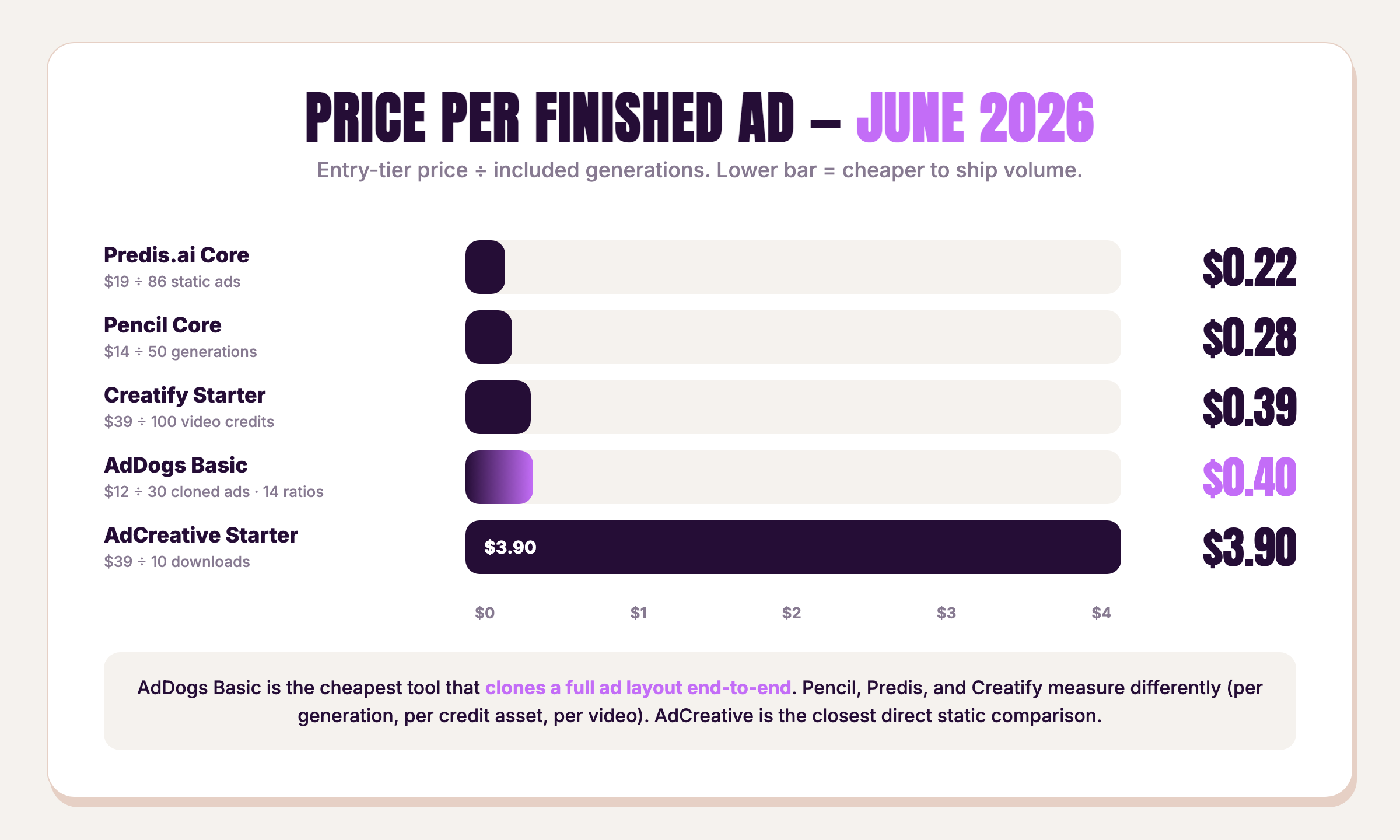
Basic divides to $0.40 per finished ad. That's the per-ad math that beats the rest of the list — except Predis.ai on raw credit cost, which arrives with caveats covered later.
Where AdDogs is honest about limits
Pro and Ultimate gate the full 14 aspect ratios. Basic ships the three workhorse ratios — square (1:1), vertical (9:16), and horizontal (16:9) — which cover Meta feed, Stories/Reels, and YouTube but lock the rest (4:5, 2:3, 3:4, 21:9, banners). If a media plan needs Pinterest pins and 21:9 cinematic at $12/mo, that's the wrong tier.
AdDogs does not make video ads. If the campaign needs TikTok UGC (user-generated content) video, Creatify is the right tool — and we say so below. AdDogs does not make presentations, posters, or documents either. Canva does those better. The boundary is intentional. AdDogs builds the ad-cloning primitive and refuses to dilute it.
For the deep one-to-one comparison see how AdDogs compares to AdCreative.ai.
Clone your first winning ad in seconds. Choose a paid plan, or see every ad in the 14,000+ library first.
2. AdCreative.ai — best for AI-scored static ad templates
AdCreative.ai is the category incumbent for performance marketers who want predictive scoring on every generated creative. Buyers see a "conversion score" before downloading — useful signal if the audience-data assumptions hold for your account.
Scoring is the real pro. Pricing is the real con. The Starter tier runs $39/mo for 10 downloaded creatives on monthly billing ($20/mo if paid yearly), triangulated across adcreative.ai's pricing section and pricing aggregators on 2026-06-27 (the page 404s on a direct fetch). That's $3.90 per finished ad — roughly ten times AdDogs Basic.
For a dropshipper running 20 variants per product across 5 products per month, AdCreative Starter covers half a product's testing budget. The Professional tier scales up from $249/mo for 50 credits ($4.98/ad), with yearly billing roughly halving the monthly rate. Predictive scoring is genuinely useful; it has to be worth that delta against your account's ROAS (return on ad spend) to land.
3. Creatify — best for AI video ads
Creatify is the obvious pick for video ads. The company raised a $15.7M Series A and reportedly hit $9M ARR per TechCrunch's 2024 coverage, and ships an Aurora text-to-video model that publishes to Meta, TikTok, and AppLovin directly. Pricing per creatify.ai/pricing accessed 2026-06-27. Starter is $39/mo (100 credits, no watermark), Pro is $99/mo (300 credits, up to 5 seats). The free tier ships 2 watermarked videos.
One thing to know if you're shopping on the word "clone": Creatify's headline feature is called AdClone, and Creatify itself disclaims what AdClone does on its own product page. Direct quote from creatify.ai/features/ad-clone: "AdClone doesn't copy word-for-word. It analyzes hook patterns, pacing, and CTA placement, then rebuilds the video ad copy for your product and audience."
Creatify clones the script idea. AdDogs clones the visual layout. Different primitives, both legitimate — see our breakdown of when to ship static vs video ads for which fits the next campaign. If the next ad needs a 15-second avatar reading a hook script, that's Creatify. If the next ad is a static product hero in the same layout as a Foreplay-sourced winner, AdDogs is the tool — Creatify won't ship the layout.
Aspect ratios on Creatify are 9:16, 16:9, and 1:1 — three, like AdDogs Basic.

Create your own product product ads
Create your ad
4. Adobe Express — best Canva-style alternative for Adobe-ecosystem buyers
Adobe Express is Canva-shaped, integrated with Firefly, and cheaper at the paid tier.
Adobe Express Free ships 100,000 templates, 1M+ Adobe Stock assets, 4,000 fonts, 5 GB storage, and a limited monthly allowance of generative AI credits at $0 — triangulated from adobe.com/express/pricing on 2026-06-27. Canva Free now ships up to 200 Standard or 20 Premium AI uses per month as of 2026, triangulated from canva.com/pricing on the same date — so both free tiers ship AI access now, with different caps and feature mixes.
Adobe Express Premium runs $9.99/mo (US base) or $11.99/mo incl. VAT in EU/UA regions, with Generative Fill, Generative Expand, Firefly text-to-image, brand kit, and social scheduling included. That undercuts Canva Pro at $15/mo (US) regardless of which free tier you started on.
Adobe Express does not clone existing ads. It generates from scratch like Canva does — the workflow is "blank canvas with AI prompts" rather than "library of running ads with product swap." For the buyer already in Adobe Creative Cloud who wants the cheapest Canva-style path, Adobe Express is the answer. For the buyer who wants to skip the canvas entirely and clone what already converts, AdDogs is.
5. Pencil (by Brandtech) — best for brand teams who need governance
Pencil sits inside The Brandtech Group, a privately held ad-tech conglomerate (formerly You & Mr Jones) valued at around $4B in a 2024 raise. That parent relationship is the wedge nobody mentions in listicles. Pencil ships governance features — data ringfencing, AI governance, dedicated CS — on the Pro tier that no other tool on this list offers.
From trypencil.com/pricing accessed 2026-06-27. Core runs $14/mo (50 generations/mo, 1 workspace, $11/mo annual). Growth runs $55/mo (250 generations, unlimited workspaces, direct product team access, $44/mo annual). Pro is custom-priced with the governance layer. Pencil defines a "generation" as each AI interaction — text, image, video, ad creative — not each finished ad. No rollover. Annual saves 20%.
For a dropshipper running 30 product tests, Pencil's generation accounting is awkward. For a brand team at a regulated company who needs receipts on every AI call, Pencil is the only option on this list that ships them.
6. Pixelcut — best mobile-first ad maker for solopreneurs
Pixelcut is the cheapest entry on the list with real AI at $8/mo billed annually ($10/mo monthly) for Pro per pixelcut.ai/pricing accessed 2026-06-27. That tier ships 600 AI credits, all AI models, unlimited background removal and upscale, a 3-seat team allowance, and 1,000 batch exports. Business is $30/mo ($24/mo annual), 3,600 credits, 10-seat team.
Pixelcut is a photo tool first and an ad maker second. Its "AI Ads" feature is listed but has no public spec on template count, layout fidelity, or platform aspect ratios — meaning it functions more like an AI photo edit with caption overlay than a layout-cloning ad engine. For a solopreneur running a side store from a phone, that workflow works. For a DTC operation running performance tests at scale, it doesn't.
7. Predis.ai — best all-in-one for small businesses running ads + social
Predis.ai bundles ad creation with social-media publishing across Facebook, Instagram, TikTok, LinkedIn, and Twitter. From predis.ai/pricing accessed 2026-06-27. Core is $19/mo with 1,300 credits, 1 brand, and 10 social channels. Rise is $40/mo (3,200 credits, 4 brands). Enterprise+ is $212/mo.
Credit math: 15 credits per image or static ad creative; carousels charge slides × image credits. At 15 credits per ad on Core, $19 buys roughly 86 finished static ads per month — $0.22 per ad on raw cost, lower than AdDogs Basic at $0.40.
Caveat: Core is locked to one brand, and ad creation is one feature inside a broader social-suite. If the goal is one tool for "post the carousel and run the ad," Predis is the lightest answer. If the goal is per-ad cloning speed across 14 aspect ratios (1 credit per dimension), Predis's thin ratios and small library erase its raw-cost edge.
Canva vs the alternatives — feature matrix
Scored 1–10 on each criterion against the transparent rubric below. The thresholds are reference points; where a tool lands between anchors — or its credit/seat pricing doesn't reduce to a clean per-ad figure — the score is interpolated with editorial judgment (this is our scoring, not an external benchmark). Ad library: 1 pt per ~1,500 indexed ads, capped at 10. Clone-the-winner: none=1, scripted=5, layout-cloned=10. Brand auto-extract: none=1, manual kit=5, color-only=7, color+logo=10. Aspect ratios: 1 pt per supported ratio, capped at 10. $/ad: ≤$0.30=10, $0.31–$0.50=9, $0.51–$1.00=8, $1.01–$2.00=5, $2.01–$3.50=3, $3.51+=2. Time-to-first-ad: ≤30s=10, 31s–2min=8, 2–5min=6, 5+min=3.
| Tool | Ad library | Clone-the-winner | Brand auto-extract | Aspect ratios | $/ad | Time-to-first-ad | Total / 60 |
|---|---|---|---|---|---|---|---|
| AdDogs | 10 | 10 | 10 | 10 | 9 | 10 | 59 |
| AdCreative.ai | 6 | 3 | 5 | 4 | 2 | 6 | 26 |
| Creatify | 4 | 5 (script only) | 5 | 4 | 5 | 6 | 29 |
| Adobe Express | 5 | 2 | 5 | 8 | 8 | 6 | 34 |
| Pencil | 3 | 4 | 5 | 6 | 8 | 6 | 32 |
| Pixelcut | 2 | 1 | 1 | 4 | 9 | 8 | 25 |
| Predis.ai | 4 | 2 | 5 | 6 | 10 | 6 | 33 |
| Canva (baseline) | 2 | 1 | 5 | 9 | 8 | 3 | 28 |
AdDogs wins on five of six criteria. Predis edges AdDogs on raw $/ad ($0.22 vs $0.40) but loses on every other ad-specific metric — library size, layout cloning, aspect-ratio fidelity. Canva scores well on aspect ratios because every standard ad size exists somewhere in its template universe; it loses on ad-library, cloning, and time because none of those exist as primitives in the Canva editor.
How to pick the right Canva alternative for your ads
Shortcut version:
- Cloning winning static ads → AdDogs. Layout-clone is the only primitive that gets you from "what's converting on Meta" to "the same thing with my product" in seconds.
- Predictive scoring on each generated variant → AdCreative.ai. Worth the $3.90/ad if scoring lifts your ROAS by more than the per-ad delta.
- AI video with avatars → Creatify. The Aurora model and AdClone-script workflow are purpose-built for it.
- Already paying for Adobe Creative Cloud → Adobe Express. Premium at $9.99/mo (US) undercuts Canva Pro, and Firefly is baked into the workflow.
- Brand team with governance requirements → Pencil. The Brandtech parent ships the agency-grade controls.
- Solopreneur running a store from a phone → Pixelcut. $8/mo annual is the cheapest real-AI entry on the list.
- One tool for ads plus social scheduling → Predis.ai. The carousel-and-cross-post workflow is the wedge.
- Non-ad design work — presentations, posters, documents → stay on Canva. It's still the right tool for that job.
FAQ
Is there anything better than Canva for ads?
Yes — for ad creation specifically, tools like AdDogs (layout cloning from a 14,000+ ad library), AdCreative.ai (predictive scoring), and Creatify (video-first) outperform Canva on speed and ad-specific workflow. The Medium operator referenced above clocked Canva at ~6 minutes per ad variation; AdDogs ships a finished ad per credit in seconds.
Is Canva good for creating ads?
Canva can make ads — the templates and export sizes are all there. It's just not built for ad velocity. The moment the job becomes "test 30 product variants across four aspect ratios this week," the template-and-tweak workflow turns into a per-variation tax. For a one-off promo graphic, Canva is the right tool; for performance-ad cadence, the ad-built tools on this list are faster.
What's the best free Canva alternative for ads?
Adobe Express Free and Canva Free both ship limited monthly AI credits in 2026 — Adobe via Firefly, Canva via Magic Studio (up to 200 Standard or 20 Premium uses per month). AdDogs is paid-only and starts at $12/month for 30 finished ads, with its reference-ad cloning workflow and automatic brand-color extraction built in.
Which Canva alternative supports the most aspect ratios for ads?
AdDogs Pro and Ultimate unlock all 14 aspect ratios (1:1, 9:16, 16:9, 4:5, 2:3, 3:4, 21:9, plus banner sizes) — pick the dimension per generation at 1 credit each. No other tool on this list opens that many native aspect-ratio options at the Pro tier's $33/mo price.
Which Canva alternative is best for Shopify product ads?
AdDogs is purpose-built for DTC and dropshippers. Auto brand color and logo extraction handle the brand layer, and the 14,000+ ad library is curated from real product campaigns across 20 industries — meaning the starting point is an ad that already converted for a similar product, not a generic template.
Who is Canva's biggest competitor?
Adobe Express is Canva's closest head-to-head competitor — same template-driven, blank-canvas model, undercutting it at $9.99/mo (US) versus $15/mo. But for ad creation specifically, the alternatives to Canva that matter aren't general design tools at all. They're ad-built tools like AdDogs that start from a library of already-converting ads instead of a blank canvas.
Are there Canva alternatives that don't use AI?
Yes — Adobe Express supports fully manual template-driven design without forcing AI generation. Inkscape and Krita are free, open-source vector and raster options for the anti-AI segment. Pixelcut leans on AI for its photo tools but keeps manual editing available.