How to use the Meta Ad Library to find winning ads (2026 beginner guide)


Nearly every top-ranking guide to the Meta Ad Library says ad cards display impression ranges and that you can filter by them. Open the tool and look. They don't, and you can't.
Meta Ad Library is Meta's public archive of the ads running right now across Facebook, Instagram, Messenger, WhatsApp, Threads, and Audience Network. It lives at facebook.com/ads/library, it's free, and no account is required — every check in this guide was run logged out in July 2026.
What Meta publishes in place of performance is time. Every ad carries a start date, and advertisers don't keep paying to run ads that lose money. Duration is evidence of survival, not proof of profit — and knowing the gap between those two things is most of the skill.
What is the Meta Ad Library?
Meta built the library for election transparency in 2018, then widened it to all advertising. Two things separate it from a paid research tool: it costs nothing, and it's deliberately incomplete. Meta publishes what regulation obliges — creative, advertiser, platforms, dates — and keeps performance private.
Meta Ad Library, Facebook Ad Library, Meta Ads Library — same tool
| Name you'll see | Where it comes from | What it opens |
|---|---|---|
| Meta Ad Library | Current official branding | facebook.com/ads/library |
| Facebook Ad Library | Pre-rebrand name, still the more-searched term | Same page |
| Meta Ads Library | Informal plural used across most guides | Same page |
| Ad Library Report | A separate spend dashboard | Political and social-issue ads only |
Only the last row is a different product — one page, three names.
Is it free? Do you need an account?
Free, and no. Search, filters, sort, and ad details all work while logged out — verified July 2026. What does require an account is the Ad Library API, which also demands government-ID verification and tight hourly limits. Skip it. Beginners get more from 20 minutes in the web interface than a week fighting an access token.
How to open the Meta Ad Library (3 ways)
Straight to the URL
Go to facebook.com/ads/library, set the country, leave the ad category on "All ads," and type a keyword or advertiser name. That's the whole flow.
From a competitor's Facebook Page (Page Transparency)
On any Facebook Page, open Page Transparency, then Go to Ad Library. You land on that advertiser's live ads, filter pre-applied — the fastest route when you know the brand.
From an ad in your own feed
Tap the three dots on any ad in your feed and follow the ad-context menu through to the advertiser's page and its Ad Library. Your own feed is a targeting signal: whatever an algorithm decided you resemble, somebody is paying to reach.
Six filters, and the two beginners misread
Six controls sit in the filter panel, with a Sort dropdown beside it — and beginners routinely misread two of them.
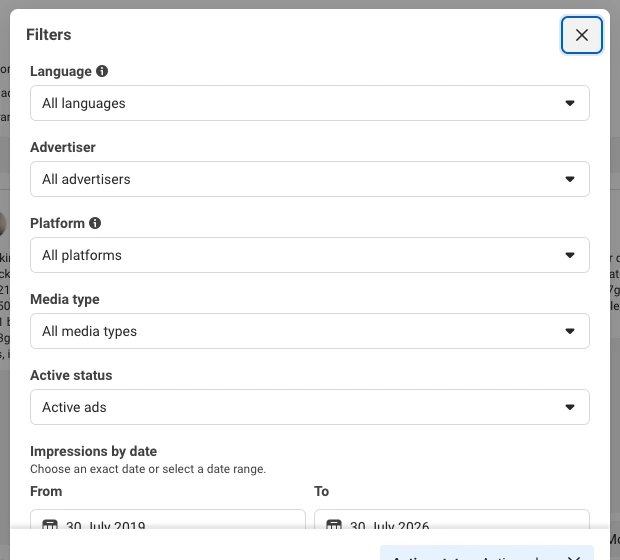
Country — set this first, or you'll find nothing
Ad Library results are country-scoped. A US ad doesn't appear in a UK search, and a brand that looks dormant in one market is often running dozens of ads in another. Set the country to the market you sell into before typing anything.
Ad category — keep it on "All ads"
Politics carries heavier disclosure than commerce, which is why the category is split. Unless you're researching campaigns, "All ads" is your setting. Note that Meta stopped delivering political, electoral, and social-issue ads in the EU on 6 October 2025, so that category is now empty across European markets.
Media type — and the two things its labels give away
Options run All, Images, Memes, Images and memes, Videos, and No image or video. Read the labels themselves — they leak how Meta's search index works (verified July 2026):
- "Memes — Images with text" means keyword search matches text rendered inside an image.
- "Videos — Keyword within video transcript or ad copy" means Meta searches video transcripts. Type a spoken hook line — "you've been folding your laundry wrong" — and you get every video ad that says it.
Active status — why inactive ads are the better dataset
Conventional advice says non-political ads vanish once they stop running. A July 2026 check says otherwise — filtering US skincare to Inactive ads returned results in bulk with complete ranges like 16 Oct 2025 - 25 Feb 2026. A four-month run, measured to the day. EU-delivered ads are archived for a year after their last impression, which keeps a large slice of retired inventory searchable.
An active ad tells you it has run at least N days. An inactive ad gives you a start and an end, so you can measure exactly how long it ran. For studying run length, inactive ads are the cleaner dataset.
Sort by impressions — and the number it won't show you
A Sort by dropdown sits apart from the filter panel and holds exactly two options: Impressions: high to low and Most recent. Applying the first one reorders the entire result set by delivery volume, and it's undocumented.
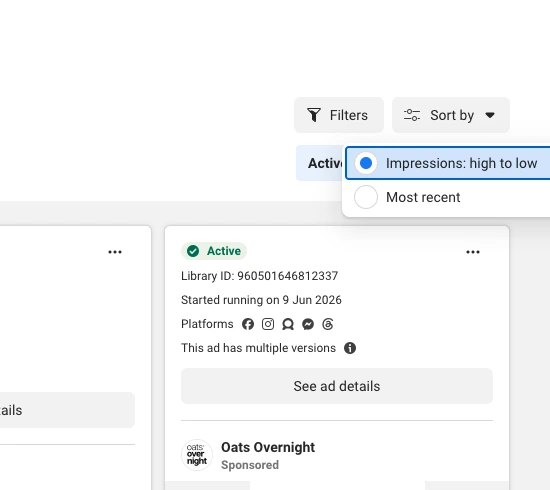
One caveat: in July 2026 testing, impression-sorted results skewed heavily toward ads carrying EU transparency labels. Treat the ordering as directional rather than exact. And if you're fuzzy on what impressions measure, the distinction matters here — impressions count views, not people.
Ad cards do carry one genuine impression signal: a "Low impression count" badge on ads under 100 impressions, shipped 22 December 2025 alongside the WhatsApp platform filter. Use it as a negative filter. A badge means the advertiser isn't scaling that ad.
"Impressions by date" is a date picker, not a volume filter
Impressions by date sits last in the panel, with helper text reading "Choose an exact date or select a date range." It filters by when an ad delivered, not how much. That one misread label started the internet's favorite Meta Ad Library myth.
| What most guides say | What's true (verified July 2026) |
|---|---|
| Impression buckets appear on ad cards | Never displayed — not on the card, not in the ad details modal |
| You can filter results by impression volume | No such filter exists — the control people misread is a date picker |
| — | A Sort dropdown does offer Impressions: high to low, and sorting works |
So the honest sentence to carry into every search: you can sort by impressions, you can't see the number, and you can't filter by it. Meta's Transparency Center and the ads_archive API reference both scope impression data to political and EU/UK ads — the same answer from two directions.
How to search the Meta Ad Library without a competitor list
Search the angle, not the brand
Advertiser search is for brands you already know. Keyword search is where discovery happens, and the trick is to search the angle rather than the category: "posture," "back pain," "LED mask," "dog dad gift," "cold plunge." Angle searches surface advertisers you've never heard of — the set worth studying, because they're spending money on the same customer you want. For a finished set from one angle-rich category, see our pet ad examples.
Build a competitor set from one category search
To spy on competitor ads properly you need a set, not one brand. Run an angle search, note every advertiser appearing more than twice, then re-run each name in advertiser mode for a teardown of their live creative, offers, landing pages, and CTAs. 10 minutes gives you a competitor list built from who's buying traffic, not from who ranks on Google.
When the search comes back empty — or returns 50,000 results
Both failures share a root: the query is aimed wrong. Empty usually means the country is set to a market the brand doesn't run in, or the name doesn't match the Page name. Broad terms fail the other way — a July 2026 search for "skincare" in the US hit a >50,000 results ceiling, which is the tool telling you you're browsing, not researching. Narrow with a media type, a platform, and a sharper angle phrase.
When a vertical genuinely has thin coverage, an ad-example library beats more searching. AdDogs keeps 14,000+ ad examples sorted by industry, platform, and format — a reasonable place to source a reference when live search comes up dry.
How to tell a scaled winner from a discarded test
Winning ads leave one honest trace in the library, and it isn't a performance number — it's time.
What run duration proves
Duration is the only signal in the library tied to an advertiser's own money. Every extra week an ad runs is another week someone chose to keep paying. Rising costs sharpen it: Meta's Q4 2025 results put average price per ad up 6% year over year with impressions up 18%, so tolerance for a mediocre creative gets shorter each quarter.
Media buyers work to rough thresholds — 14+ days, 30 to 90 days, 60+ days as the "proven" mark. Treat those as practitioner convention, not measured fact. No Meta data validates any of them.
Count Library IDs, not version badges
Every ad card carries a Library ID. Some also carry the line "This ad has multiple versions." That badge is a weak signal, because Meta's own dynamic-creative and Advantage+ campaigns assemble variations automatically — the badge may describe the platform's behavior rather than the advertiser's conviction.
Strong replication looks different: one concept appearing as multiple separate cards with distinct Library IDs. Automation doesn't mint new Library IDs. A human deciding a winning angle deserves five more builds does.
The winner check, step by step
- Set the country to your selling market, and leave the ad category on "All ads."
- Search the angle, not the brand.
- Filter Media type to Images or Memes for static creative, or Videos to search a spoken hook.
- Apply
Impressions: high to lowfrom the Sort dropdown to rank the set by delivery. - Discard anything carrying a "Low impression count" badge.
- Shortlist the oldest
Started running ondates still standing. - Count distinct Library IDs per concept — replication across separate IDs beats a single long-running ad.
- Re-run the same search with Active status set to Inactive to read complete start-to-end run lengths.
- Screenshot the winners, then look for the structure repeating across them rather than fixating on one ad.
Nine steps, roughly 20 minutes, no paid tool.
When duration lies
Four failure modes, all worth checking before you trust a long run:
- Brand campaigns run long on brand budget, with no direct-response economics attached.
- Evergreen ads run indefinitely by design — app installs and retargeting sets stay switched on for years.
- "Active" means switched on, not spending. Meta publishes status, never delivery. An ad on a starved budget renders identically to one being scaled hard.
- Somebody else's economics aren't yours. A 90-day ad proves a layout worked with their product, their price, their margin, and their audience.

Create your own facebook product ads
Create your ad
What the Meta Ad Library shows — and what it hides
One ledger, verified July 2026:
| Shown on every commercial ad | Never shown |
|---|---|
| Active or Inactive status | Impressions, in any form, on the card or in the modal |
Library ID | Spend, cost per mille (CPM), CPC, CTR, ROAS, or conversions |
Started running on [date], or a full range if inactive | Targeting, audience size, or placements bid on |
| Platform icons across the six Meta surfaces | Engagement counts — likes, comments, shares |
| Creative, primary text, headline, display link, CTA button | The landing-page funnel behind the click |
| "This ad has multiple versions," where applicable | Any indication of whether the ad made money |
Two exceptions cut across that table. Political and social-issue ads are retained for seven years with spend, reach, and funding entity. And EU-delivered ads expose considerably more, which is the next section.
If the hidden column is the part you need, the free library has hit its limit. Spend, targeting, and conversion data are what paid research tools sell, and we compared 20 ad libraries on exactly that axis.
EU transparency trick: exact reach and demographics, free
Open any ad's See ad details, then Transparency by location. On a normal commercial ad — Orgain, a US protein-powder brand, checked live on 30 July 2026 — that panel returned:
- EU ad audience, stating the advertiser's EU targeting — or, as here, that "Orgain did not target an audience in the EU." The ad reached Europe anyway.
- EU ad delivery →
Reach: 10,851— an exact figure, not a bucket, defined by Meta as the number of EU accounts that saw the ad at least once. - Reach by location, age and gender — a row-by-row demographic table running
Austria / 25-34 / Female / 3,Belgium / 35-44 / Male / 16, and so on across member states.
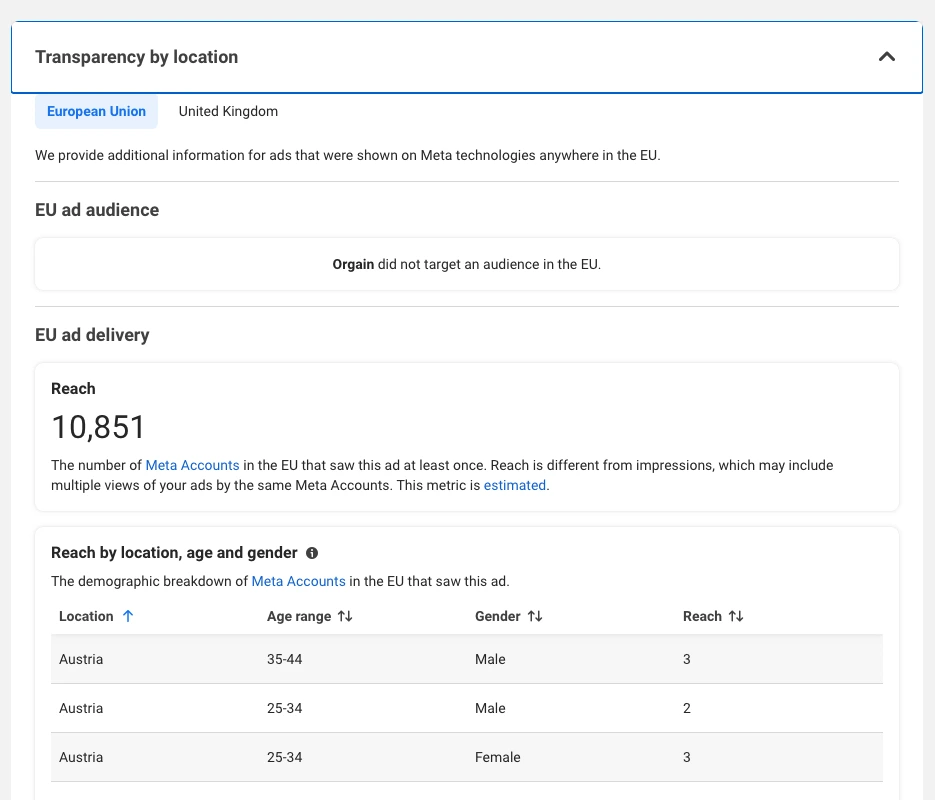
Three things make that unusual. It's a commercial ad, not political, and every guide frames reach as political-only. It's an exact number, not a range. And you reach it from the US library without switching countries — the ad only has to have delivered somewhere in the EU.
Open Transparency by location on any ad from a brand that also advertises in Europe — no country switch needed.
You found a winning layout. Now you need 15 of them.
Creative is the largest single lever in the Meta auction. Meta's data science team put it at 56% of auction outcomes — more than bid strategy, targeting, and placement combined — at the 2023 Performance Marketing Summit, as reported by Vidmob.
Why one "inspired" ad teaches you nothing
Meta's own creative-fatigue research found conversion likelihood drops roughly 45% by the fourth repeated exposure, and that over 19% of impressions reach the same person more than five times in 30 days (2023 study). Fatigue arrives far earlier than beginners plan for.
Which reframes the replication signal you just learned to read. When a funded competitor runs one concept across eight distinct Library IDs, that's not showing off — that's what surviving fatigue costs. Volume of variants on a proven concept is the strategy. One perfect ad is a gamble.
From one reference ad to a full variant set
Producing that set is where beginner momentum dies.
Upload the ad you found to AdDogs' ad builder as a reference and add a photo of your product. AdDogs rebuilds the composition with your product in the frame and extracts your brand colors and logo automatically. Pick the dimension the placement needs, and repeat for each variant. The three below are real, unretouched AdDogs generations for three different products:

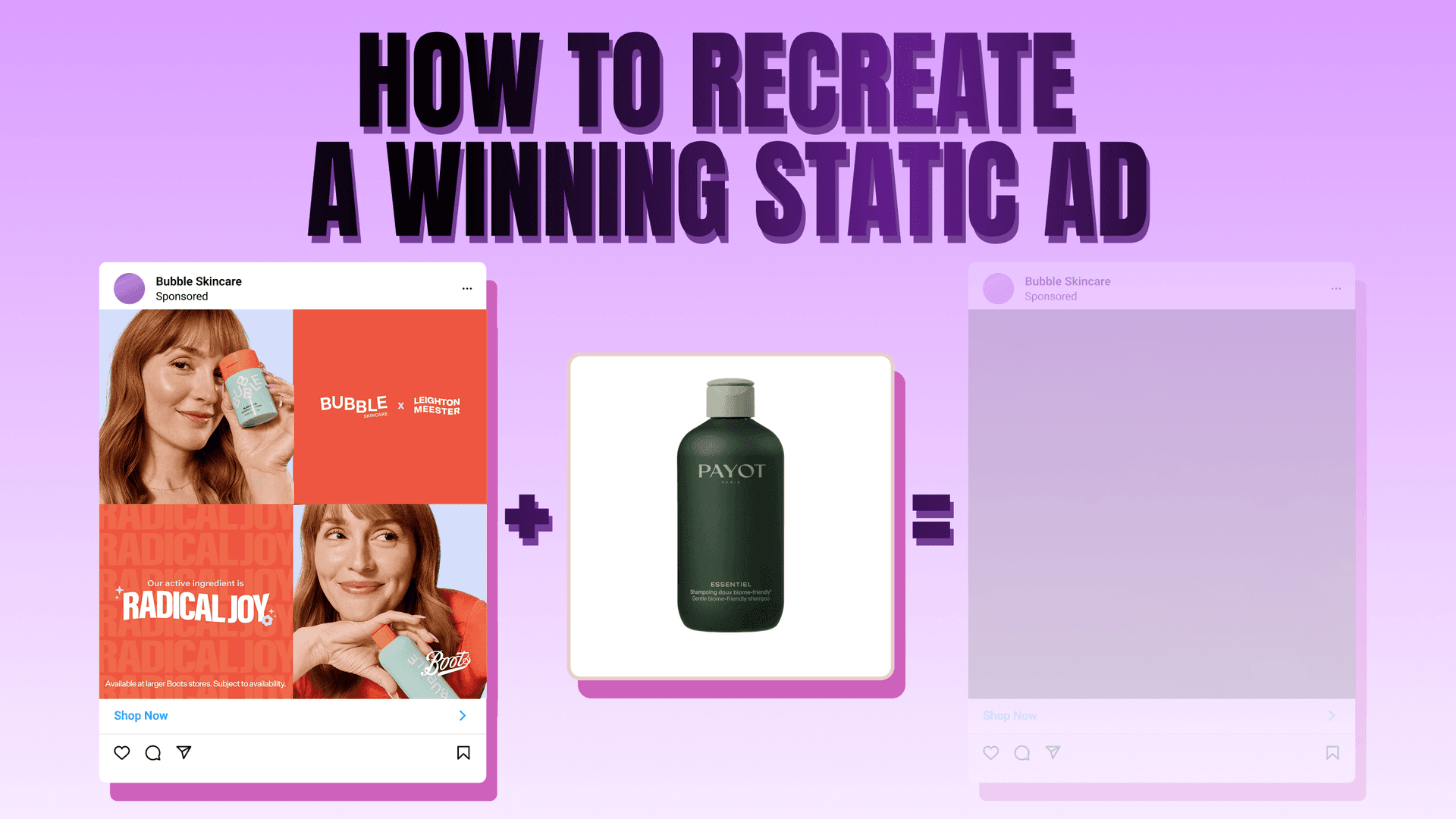
One honest limit: the Ad Library skews heavily to video, and AdDogs produces static creative. If your winner is a video ad, what carries over is the concept and the static frame, not the motion. Full mechanics of that handoff live in our guide to recreating a winning static ad, and our guide to how many creatives to test sets the volume target.
Common mistakes that waste your research time
- Bookmarking rather than screenshotting. Ad Library permalinks decay — the ad stops running, the link 404s, and your swipe file becomes a list of dead URLs. Screenshot the creative and record the Library ID and dates in the same place.
- Researching in the wrong country. Most "this brand has no ads" conclusions are a country selector left on the wrong market.
- Chasing the API. Government-ID verification, tight hourly limits, and a scope returning the same fields the web page already shows.
- Copying protected expression. Layout, format, hook pattern, and CTA placement are unprotectable ideas under 17 U.S.C. § 102(b). Specific photographs, illustrations, and copy are not. Clone the structure, shoot your own assets — our breakdown of whether it's legal to clone a competitor's ad covers the edge cases.
- Stopping at the folder. A swipe file is a fine input and a terrible output. Research that ends in a folder of screenshots produced nothing you can run.
FAQ
Is the Meta Ad Library free?
Yes — free, with no account, no trial, and no usage cap on the web interface, verified logged out in July 2026 across the US and German libraries. Only the API costs you anything, and what it costs is government-ID verification plus a tight hourly request limit.
Can you see how many impressions a Meta ad got?
Not for commercial ads. You can sort a result set with Impressions: high to low, but the number is never displayed on the card or in the ad details modal, and no volume filter exists. Meta publishes actual figures only for political, social-issue, and EU/UK ads, per its Transparency Center.
How far back does the Meta Ad Library go?
Depends on the ad type. Political and social-issue ads are retained seven years, and EU-delivered ads stay archived one year after their last impression — which is why inactive searches return so much. Ordinary US commercial ads carry no retention guarantee once they stop running.
Can you see how much a competitor spent on a Facebook ad?
No. Spend disclosure is limited to political and social-issue advertising. EU-delivered commercial ads expose reach and demographics through Transparency by location, but reach counts accounts that saw the ad — not a spend figure, and no conversion between the two exists.
Why are a brand's ads missing from the Meta Ad Library?
Three usual causes: the country filter is set to a market the brand doesn't advertise in, the search string doesn't match the exact Facebook Page name, or the ads stopped running while Active status is still on "Active ads." Switch to inactive and re-check before concluding a brand isn't advertising.
What are the limitations of the Meta Ad Library?
No performance data on commercial ads, country-scoped results, a >50,000 display ceiling on broad keywords, and permalinks that decay once an ad retires. Coverage also skews to video, so static-only researchers live in the media-type filter.
Is it legal to recreate an ad you found in the Meta Ad Library?
Cloning the structure is legal. Copying the expression is not. Layout, format, concept, hook pattern, and CTA placement are unprotectable ideas under 17 U.S.C. § 102(b), while the specific photograph, illustration, copy, and logo are protected. Platform policy is a separate matter from copyright law — our legal guide covers both.