How to Recreate a Winning Static Ad With Your Own Product
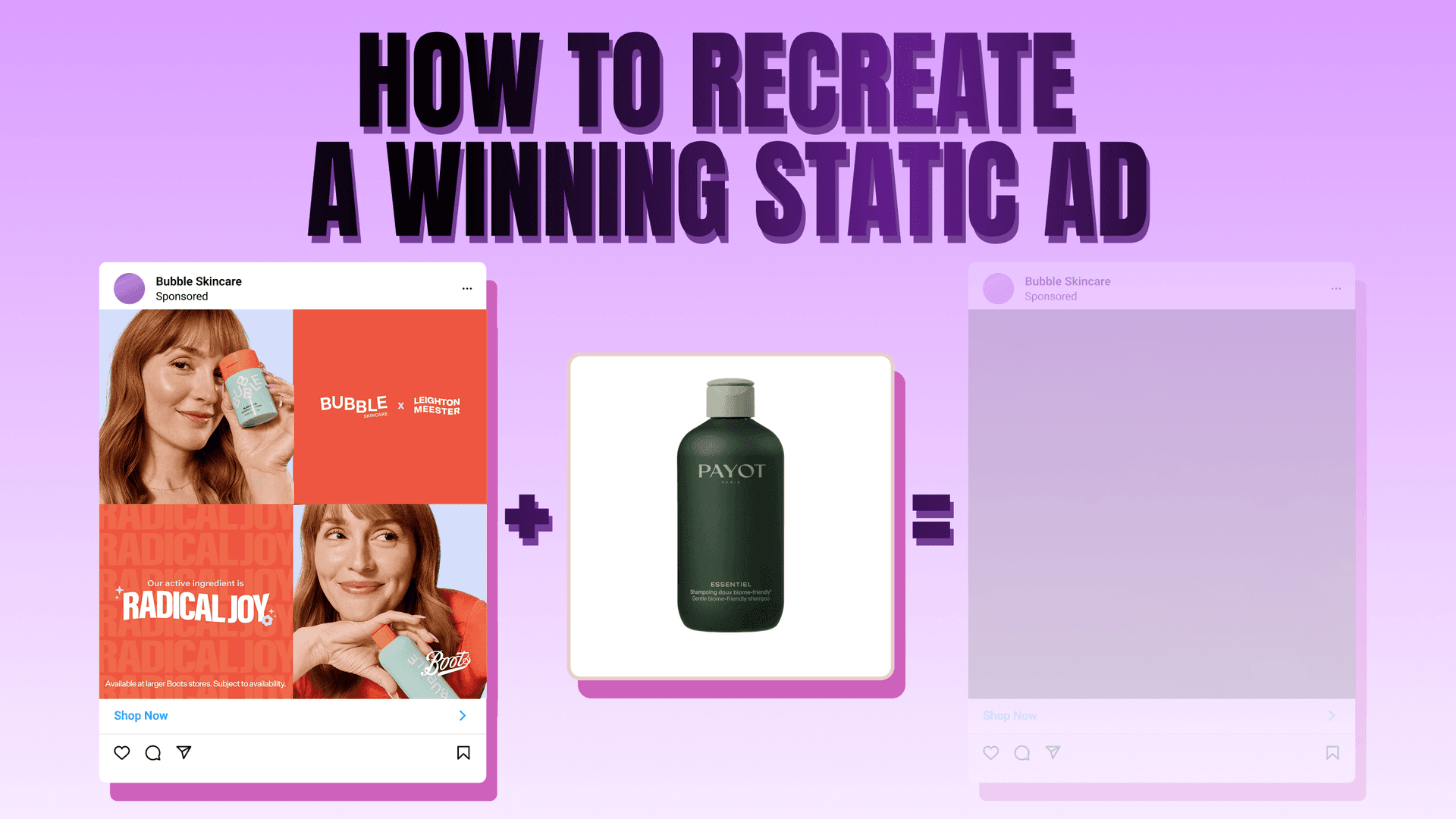


Start from an ad that's already paying for itself. Clone its layout, drop in your product, ship. An AI ad maker isn't a conversion lift — it's a cheap, fast way to ride a proven winner with your own product for the price of a stock photo. The model doesn't make your ad win; the proven winner you cloned does. So skip the blank prompt. This guide walks the full image-to-image loop — you create ads with AI by feeding two inputs to the model — including the part everyone skips: how to make AI ads that don't look AI-made.
The clone-an-ad crowd — Creatify, Arcads, AdStellar — is video-first: talking avatars, URL-to-video, UGC reels. Static-image cloning, the cheapest and fastest creative test there is, sits almost completely unowned. That's what this post is about.
The static-clone loop, end to end
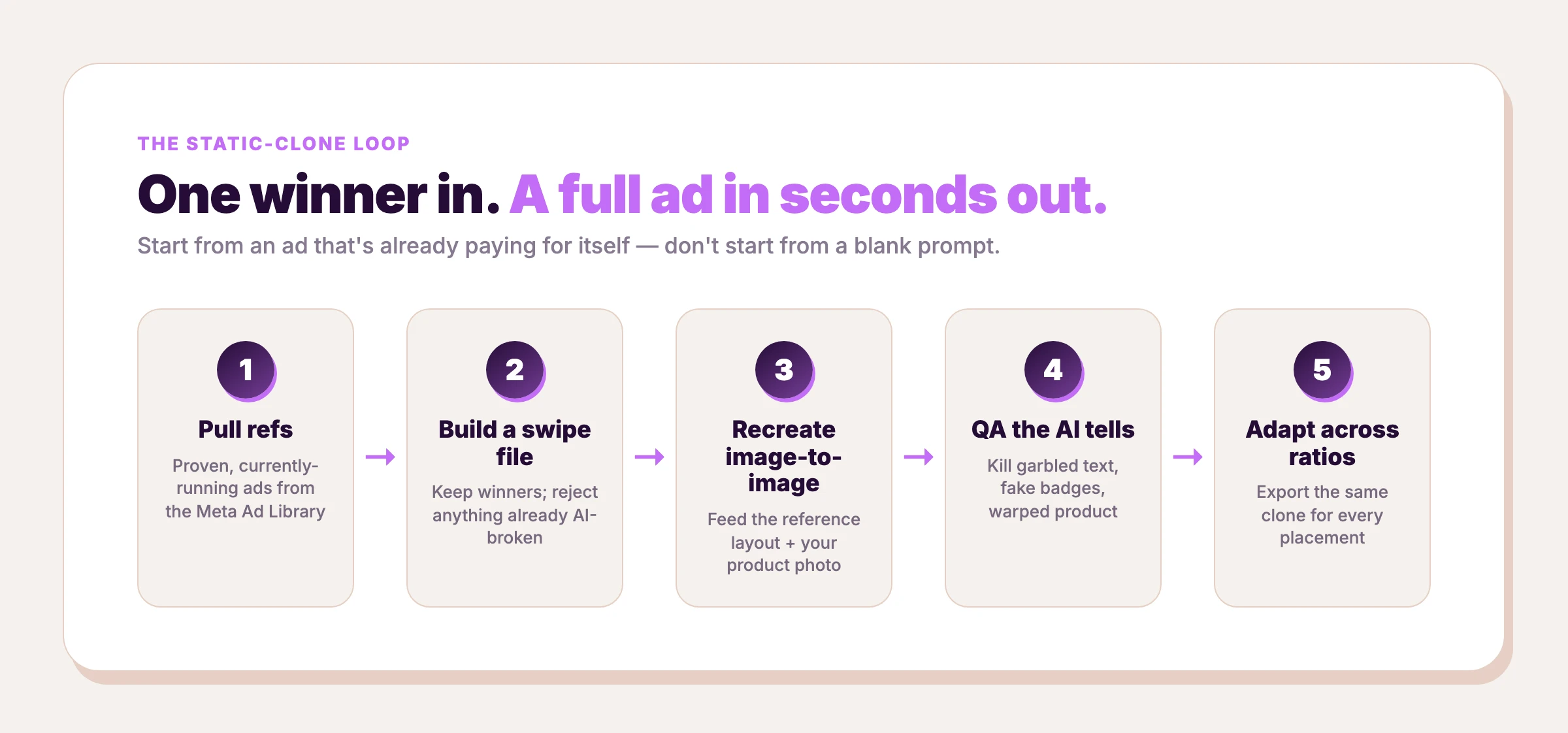
The whole workflow is five steps, and the last one turns a single winner into a full platform set:
- Pull refs from the Meta Ad Library — proven, currently-running ads in your niche.
- Build a swipe file — keep only the winners, reject anything already AI-broken.
- Recreate it image-to-image — feed the reference layout plus your product photo to the model.
- QA the AI tells — kill the garbled text, fake badges, and warped product before you launch.
- Adapt across ratios — export the same clone for every placement.
We didn't invent this workflow. It's the loudest working pattern in the paid-social community. Operators in r/FacebookAds describe exactly this: pull from the library, clone, test static creatives at volume. The demand for a working static-creative how-to is real, and right now the best version of it is buried in a Reddit thread.
Why static, not video, for testing velocity
Static is the cheapest creative test you can run. And 91.7% of the 14,000+ ad examples we hold are static-format. That number describes our image-only library, not which format converts — we can't store video, so the share proves nothing about performance. What static actually buys you is velocity: one image, one generation, one fast test. A video is a shoot, a script, an edit.
That velocity matters because Meta creative fatigues fast: performance can drop within 3–7 days on high-velocity platforms, per Segwise. If your creative dies that quickly, the bottleneck isn't "how good is one ad," it's "how many proven angles can you test this week." Static is the format that lets you answer that cheaply. (For the full format trade-off, see our breakdown of static vs video ads.)
And static winners are durable. Across the proven-winner corpus we analyzed, the median ad ran 202 days, and the longest-running ad has been live for 6.2 years (2,251 days). An ad that runs that long is paying for itself every day. Those are the ads worth cloning.
What winning static ads have in common
Before you clone, know what you're cloning for. Winners aren't random. They share a short list of traits, and once you can name them, "this ad looks nice" becomes "this ad does a specific job we can reproduce."
A blunt, action-first CTA. Across the 2,390 ads in our library that carry a recorded call-to-action button, "Shop Now" outnumbers "Learn More" by nearly five to one — 367 versus 75. That's a pattern in winning DTC static ads, not a universal rule: the proven ones tend to point straight at the purchase rather than at a soft "learn more." When you clone, keep that energy. Inherit the direct CTA verb; don't soften it.
A handful of recurring layouts. Most winning static ads are a variation on one of four archetypes — the product on a clean background, the product in use (in-hand or lifestyle), the split-screen or before-after, and the testimonial or social-proof card. Learn to name the archetype on sight, because it tells you what the layout is doing and therefore what to preserve when you drop your product in.
One job per ad. A winner makes a single promise: one hook, one benefit, one CTA. If a reference is trying to say three things at once, skip it. Pick the disciplined ads; they recreate cleanly.
Step 1 — Source proven winners from the Meta Ad Library
Open the Meta Ad Library. It's free and public, and it's the best swipe file on the internet — because it shows you exactly what brands are paying to run right now.
Filter to your niche or a competitor's brand, set the type to ads, and start pulling. Aim for 20–30 currently-running ads. The signal you're hunting is longevity: an ad that has been running for months is an ad that's profitable, because nobody burns budget on a loser for a quarter. In that same corpus, 64.3% of winners ran 180 days or longer and 30.1% ran a full year, so "still running after months" is a strong proxy for "this converts."
Two things speed this up. First, lean on existing teardowns: our roundup of the best ad-examples libraries and our Facebook static ad examples collection both pre-filter for winners. Second, our own library skips the manual scrape entirely — 14,000+ real, currently-or-recently-running static ads, already vetted, browsable by industry and platform. Either path gets you to the same place: a pile of vetted references.
What to actually look at
The Library shows you more than a picture. Each entry shows the date the ad started running — sort by it, because longevity is the signal that matters. Then watch for volume: when a brand is running eight or ten near-identical versions of one layout, that layout is its workhorse, and a brand's workhorse is the safest thing in the niche to clone. For ads served in the EU, the Library also exposes exact reach and demographic breakdowns (spend is published only for political and social-issue ads); use them where they appear to separate a funded winner from a fresh test — our Meta Ad Library guide walks through reading that panel. And cross-check the brand's landing page. When the ad's promise matches a polished, conversion-built page, you're looking at a real campaign, not an experiment.
Step 2 — Build your swipe file
A swipe file is just your shortlist of keepers. The discipline is in the rejects. Keep an ad only if it reads as a genuine winner — clean layout, clear hook, a product shot you could plausibly substitute. Reject anything that's already AI-broken: garbled text, a fake-looking product, melted hands, a trust-badge that doesn't exist. You're about to clone whatever you keep, and the model will faithfully reproduce a flaw if you feed it one.
If you want a head start on what a clean, clonable static ad looks like, our Instagram static product ad examples post is a gallery of 14,000+ pre-vetted real ads filtered down to the ones worth copying. Build your file from winners, and the rest of the loop gets easier.
Organize by angle and archetype
A pile of screenshots isn't a swipe file; a sorted one is. Tag every keeper two ways: by angle (problem–solution, social proof, the offer or discount, before–after) and by the layout archetype above. Record the reference URL and its start date next to each, so you can re-check later whether it's still live — an ad still running months on is an ad still winning. The payoff comes when you sit down to produce: instead of staring at chaos, you pull "the three strongest problem–solution layouts in my niche" and clone the best one. Organized inputs are the whole difference between testing two angles this week and testing ten.
Step 3 — Recreate it with an AI ad maker, image-to-image
This is where a real AI ad maker earns its keep. You feed two inputs to the model: the reference ad as a layout and your product photo. The model preserves the composition that made the original work — the type hierarchy, the negative space, where the eye lands first — and swaps your product into the slot the original product occupied. You keep the winning structure; you change the thing being sold.
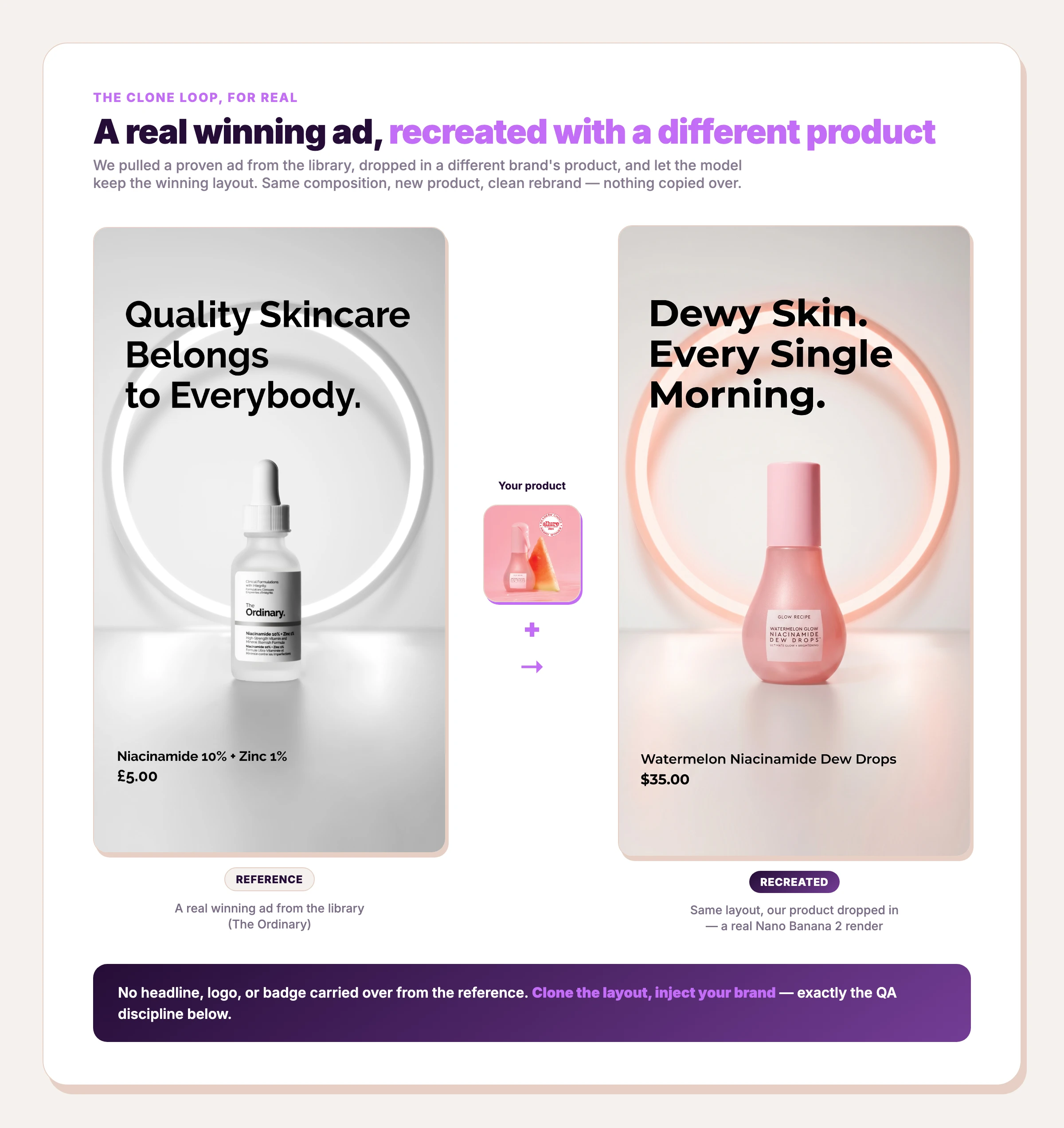
Run the loop on AdDogs' static-ad maker: drop in a winning reference you pulled from the library, drop in your product shot, and Nano Banana 2 recreates the exact layout rebranded around your product. It then extracts your brand color and applies it automatically. Logo extraction is Pro and Ultimate only — Basic won't auto-apply a logo. The before-and-after below is exactly that: a real skincare ad on the left, a different brand's serum dropped into the same layout on the right — same composition, new product, nothing copied over.
The one decision worth making deliberately is the model. Not all of them hold layout and type the same way under an image-to-image edit. We pulled the comparison apart in the best AI image model for ads, and we wrote up why we run Nano Banana 2 specifically. Pick a model built for editing a reference, not one built for inventing from scratch.
What to tell the model
Image-to-image is a different skill than text-to-image. You're not describing an ad from nothing; you're handing the model a finished one and telling it what to hold and what to change. Three instructions do most of the work:
- Preserve the layout. Same composition, same type hierarchy, same negative space. You're not re-art-directing the ad, you're inheriting it. Say so explicitly.
- Replace only the product. Swap in the item from your product photo, matching its real shape, proportions, and label. Everything else stays.
- Spell out the text. If you want a headline rendered, type it verbatim in the prompt rather than trusting the model to paraphrase. This is where garbled copy comes from.
Two habits sharpen the output. Match your product photo to the reference's lighting and angle before you start. A flat catalog shot dropped into a moody lifestyle layout fights the composition, so feed the model a product image shot roughly the way the reference product was shot. And resist the urge to "improve" the winner on the first pass: clone it faithfully, ship it, and let the test tell you what to change — the reference already proved the layout works. Generate two or three variants, then take the cleanest one into QA — image-to-image is non-deterministic, and the second pull is often tighter than the first.

Create your own product product ads
Create your ad
The low-cost path — proving the workflow without an expensive design stack
AdDogs Basic starts at $12/month for 30 finished ads, giving you enough volume to prove the clone loop across several concepts before moving up a tier. The entry plan covers the three core social ratios — 1:1, 9:16, and 16:9 — and every export is 2K. For tools that still offer free tiers or trials, see our rundown of the best AI ad generators.
A worked example: cloning a winner end to end
Make it concrete. Say you sell a magnesium supplement and you want a feed ad ready by tonight.
Source. Open the Meta Ad Library, filter to the supplement niche, and pull the ten longest-running ads. One has been live for months: a single bottle on a warm, clean background, a three-word benefit headline, and a "Shop Now" button. Months of runtime is your green light — somebody is paying to keep that ad alive.
Name the archetype. This is product-on-background. The layout's whole job is to make one bottle look premium and let the headline carry the promise. That tells you what to protect when you swap your own bottle in.
Recreate. Feed that reference plus a clean photo of your bottle to the maker. Tell it to keep the layout and headline position, swap the bottle, and render your exact label text. It returns your bottle in the proven frame, your brand color pulled in automatically.
QA. Zoom to 100%. The headline is clean, but a faint "clinically tested" stamp carried over from the reference — your product has no such study, so you delete it. The bottle label is sharp and matches your real SKU. Pass.
Adapt. Export 1:1 for the feed and 9:16 for Stories. Two placements, one credit each, no designer in the loop.
A few minutes, a couple of credits, and a feed-ready ad riding a layout that already converts.
Step 4 — QA checklist: the AI tells to kill before you launch
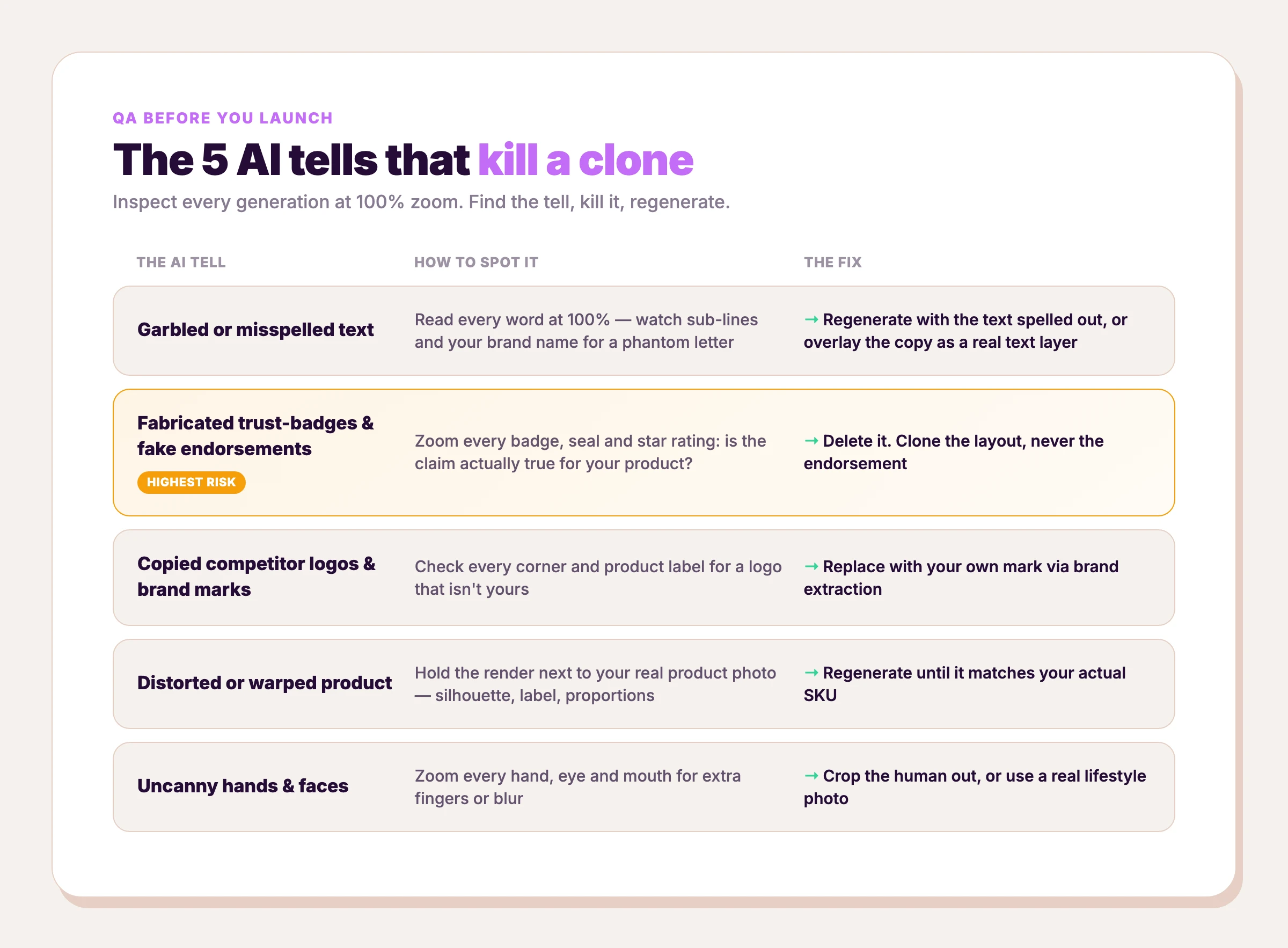
Most clone tutorials stop before QA. That's why so many AI ads ship a six-fingered hand or a fake badge straight to a live account. Inspect every generation at 100% zoom, find the tell, kill it, then regenerate or overlay. Here are the five that matter.
Garbled or misspelled text
The classic tell. Headlines render fine, then a sub-line dissolves into letter-soup, or your brand name gains a phantom letter. Read every word at 100%; don't skim. The fix: regenerate with the text spelled out explicitly in the prompt, or overlay the final copy as a real text layer instead of trusting the model to paint it.
Fabricated trust-badges and fake endorsements
This is the dangerous one — and the easiest to miss. When you clone an ad that had a "dermatologist recommended" stamp or an association seal, the model often invents its own version: an "APMA approved" badge for a product that has no such approval, a five-star rating nobody gave you. That's not a cosmetic flaw. It's a false claim, and false claims create real ad-policy and legal exposure. Zoom on every badge, seal, and star rating and ask: is this claim actually true for my product? If not, delete it. Copy the composition; leave the endorsement behind.
Copied competitor logos and brand marks
The model is reproducing a reference, so it will sometimes drag the original brand's logo or wordmark into your clone. That's a trademark problem, full stop. This is exactly why the rule is clone the layout, inject YOUR brand: the composition is fair game, the brand marks are not. Check every corner and product label for a logo that isn't yours. The fix is brand extraction: replace the original mark with your own. (For where the legal line actually sits, read is it legal to clone an ad.)
Distorted or warped product
The whole point of this loop is that the ad sells your product, so the product has to match your real SKU. Models warp bottle shapes, invent extra buttons, and smooth away the exact detail a buyer looks for. Hold the generation next to your real product photo. If the silhouette, label, or proportions drift, regenerate — a clone that ships the wrong-looking product is worse than no ad.
Uncanny hands and faces
Synthetic humans are the model's hardest test — six-fingered hands, teeth that blur, eyes that don't track. Beyond looking cheap, photorealistic synthetic people are exactly what triggers platform AI-labeling overlays. Zoom on every hand, eye, and mouth. The fix: crop the human out, use a product-only composition, or use a real lifestyle photo and let the model handle only the layout around it.
Step 5 — Adapt one clone across every aspect ratio
You have one clean clone. Now turn it into a full placement set, because one ad in one ratio is one placement. Map the dimension to the surface: 1:1 for the feed, 9:16 for Stories and Reels, 16:9 for YouTube and in-stream, 4:5 for the taller feed slot that eats more screen on mobile. Our ad sizes and specs guide has the full placement-by-placement table.
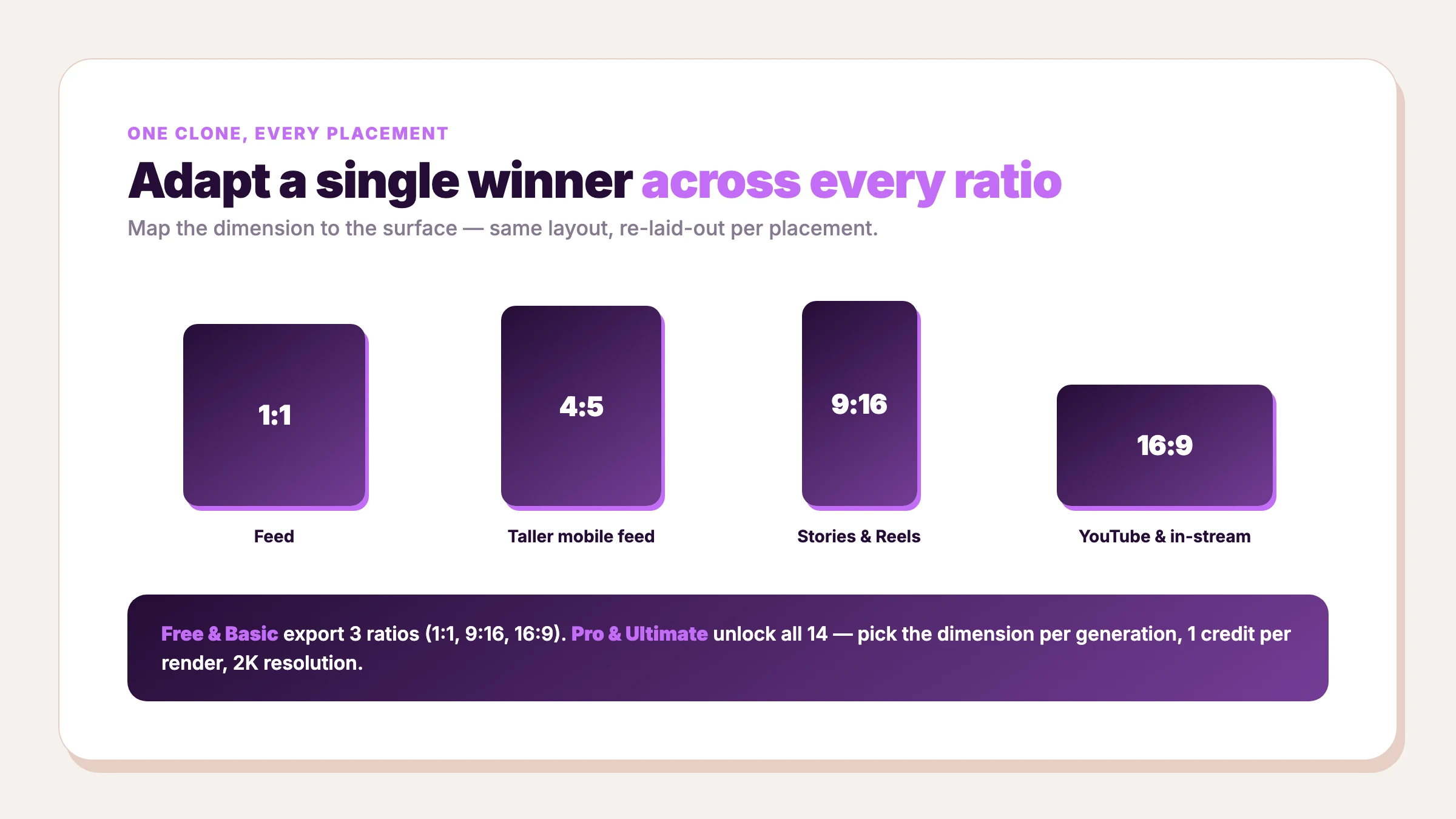
The practical split on AdDogs: Pro and Ultimate unlock all 14 aspect-ratio options — you pick the dimension per generation, 1 credit per render. Basic exports three (1:1, 9:16, 16:9). Every plan renders at 2K resolution. So one winning concept becomes a feed ad, a Stories ad, and a YouTube ad: same layout reflowed per surface, one render each.
AI UGC ads — the rising lane, where static still fits
UGC video — talking-avatar and URL-to-video ads — is a fast-growing format in paid social, and it costs far more than a static clone does. Sequence them instead of choosing: test static first because it's the cheapest signal, then push your proven angles into UGC video once you know what resonates.
Common mistakes that kill a clone
The loop is simple, but a few mistakes turn it into wasted credits.
- Cloning a loser. The entire edge is the proof. Clone an ad you "like" instead of one that has demonstrably run for months, and you have thrown away the only advantage AI gives you here.
- Over-prompting. Piling adjectives onto an image-to-image edit fights the reference. Say less; let the layout lead.
- Cloning the endorsement, not just the layout. Take the layout. Drop every borrowed badge and claim. This is the mistake with legal teeth.
- Shipping one ratio. One placement is a fraction of your reach. Adapt the clone to every surface before you call it done.
- Testing too few angles. Static's only real advantage is volume. Three clones is a hobby; ten proven angles a week is the workflow.
- Scaling before you have a winner. Static finds the winner cheaply. Pour budget in only after a clone beats your control.
FAQ
Is it legal to clone or recreate an ad with AI?
Generally yes — cloning the composition or idea of an ad is legal; copying a brand's logo, wordmark, product, or trade dress is not. The line is between the layout (fair game) and the specific brand expression (protected). For the full 2026 breakdown across platforms and AI copyright, see is it legal to clone an ad.
Do AI-made ads get flagged or banned by Meta?
No — AI creative is allowed. Meta auto-applies an "AI info" label to AI-generated ad media (Meta Transparency Center; Meta Business Help), which is a label, not a ban. The real account-ban risk is a completely different thing: pointing an unofficial automation bot at Ads Manager (per Supermetrics). AdDogs only generates a file you upload yourself — it never touches your ad account.
How much does it cost to make an AI ad?
AI-ad tooling can run around $0.90 per ad, per Aden's Lab. On AdDogs the math is simpler: 1 credit = 1 ad, and Basic is $12/mo for 30 credits, which works out to $0.40 per ad ($12 ÷ 30).
Can ChatGPT generate ads?
Yes — ChatGPT can draft ad copy and rough out an image through its image model, so it's a fine starting point. The limitation is that it has no proven-winner library to clone from and no brand-extraction loop, so it can't run the clone-a-winner workflow this guide is built on. It's a blank-canvas tool, not a recreate-the-winner tool.
Can you make AI ads for free?
Yes — several AI ad makers offer free tiers or trials, but AdDogs is paid-only. Basic starts at $12/month for 30 ads at full 2K resolution with three export ratios; Pro and Ultimate add all 14 ratios and logo placement. For which tools are genuinely free versus free-trial-then-paywall, see the best AI ad generators.
What is the best AI ad maker for static ads?
The best one for this workflow is whichever holds a reference layout faithfully under an image-to-image edit and lets you inject your own brand — that is an editing tool, not a scratch generator. Many popular "AI ad makers" are video-first or blank-canvas, which cannot run the clone-a-winner loop. For static cloning specifically, you want a proven-ad library plus brand extraction; our comparison of the best AI ad generators breaks down which tools do what.
How many ad variations should you test?
As many proven angles as you can clone cheaply — volume is the entire point of static. A practical floor is a handful of distinct angles a week, each a clone of a different proven winner, not ten tweaks of one idea. Kill the losers fast and clone more from the angles that survive.
Can AI replace a graphic designer for ads?
For high-velocity testing of proven layouts, largely yes — recreating a winner and adapting it across ratios no longer needs a designer in the loop. For original brand art, a distinctive campaign concept, or anything off the proven-layout path, no. Treat AI as the testing layer and a designer as the scaling-and-originality layer.